YouTube Shopping for Brands: How Product Tagging Works

Your leadership team just walked out of a quarterly planning meeting with a direct question: why aren't your products shoppable on YouTube yet? Your ecommerce manager assumes it's a quick feed toggle that drops buy buttons onto creator videos. Meanwhile, your finance lead wants proof that creator commissions won't just pay for orders your brand was going to win anyway.
Both instincts miss half the picture. Viewers already treat YouTube as a research desk before they pull out a credit card. According to Think with Google, viewers worldwide watched more than 35 billion hours of shopping-related video between January 27, 2024, and January 26, 2025, and in a Google survey of 2,420 U.S. adults who shopped with online video in August and September 2023, 78% agreed that YouTube has the most trusted creators for product recommendations while shopping.
That demand explains why brands are leaning in, but YouTube Shopping works best when you treat it as a consideration engine rather than a simple tag-and-checkout shortcut. Product tags shorten the distance between curiosity and purchase, yet they only pay off when your catalog is clean, your creative matches your feed, and your measurement proves the sales are newly generated.
Table of Contents
What YouTube Shopping Is and Who Uses It - How the Program Grew Into a Commerce Channel
How Product Tags Turn Video Into Sales Paths - The Viewer Journey From Screen to Order - Matching Each Video Format to the Right Job
Requirements Checklist Before You Go Live - Account and Catalog Foundations - Creator Screening and Team Ownership
Matching Creative and Catalog So Tags Land Right - Why Machine Tagging Needs Clear Signals - Four Production Rules for Tag-Ready Video
Reading Tagged-Product Metrics Without Guessing - Running a Weekly Diagnostic Review - Reconciling Gross and Net Sales
Funnel Stages Where Shoppable Video Fits - How a Long Consideration Cycle Actually Plays Out - Picking the Stage for Your First Video
Run a Holdout Test Before You Scale Creator Spend - Six Steps to Measure True Incremental Lift - Privacy Limits and Scaling Decisions
What YouTube Shopping Is and Who Uses It
A shopper opens a review to settle one question: “Will this work for me?” YouTube Shopping sits inside that moment. Brands can attach catalog products to long-form videos, Shorts, and livestreams, so discovery, evaluation, and purchase happen in the same viewing session instead of sending people to hunt through a description link.
Say a mid-market cookware brand launches a cast-iron skillet. In the old path, a recipe creator mentions the pan, the brand drops a tracked URL below the fold, and mobile viewers drift away before the site loads. With product tags, the creator can attach the exact skillet SKU to the video: the viewer sees the item, hears why it heats evenly, checks price and variants, and taps into the product listing while the demonstration is still fresh.
That is why the clean definition is not “buy buttons on videos.” YouTube Shopping is a consideration layer: it reduces the gap between “I'm comparing options” and “I know which one I want.” Three groups use it differently. Brands supply the catalog, product data, and commission logic. Creators add context, credibility, and the tag. Viewers use tagged products as a shortcut from research to checkout.
How the Program Grew Into a Commerce Channel
The feature expanded market by market, not as one worldwide switch. Trade coverage such as Digiday's report on a planned U.K. launch fits that staged pattern.
South Korea live-commerce launch: In June 2023, YouTube opened a dedicated shopping channel in South Korea, built around live shopping broadcasts and a small group of participating brands.
U.S. creator affiliate expansion: Later in 2023, YouTube introduced its Shopping affiliate program to selected U.S. creators so they could tag products and earn commissions on viewer purchases, then broadened U.S. access in August 2024 to include more creators and Shopify merchants.
Wider market rollout: Later expansion followed the same pattern: local commerce connections, creator eligibility, and product tagging adapted to each market.
Because products can appear in long reviews, livestreams, and vertical clips, format planning matters before feed setup. Teams pairing quick vertical demos with deeper product tours can use short video strategy tips for marketers to keep short formats paced clearly while the product stays easy to identify.
Before touching a product feed or recruiting partners, decide the job the program must do: awareness, consideration, or direct sales. That choice sets which formats you commission, which metrics you review weekly, and how you judge creator commissions. If a tagged video only collects demand that search, email, or retargeting would have closed anyway, it is a cost attached to a sale, not proof that YouTube created one.
How Product Tags Turn Video Into Sales Paths
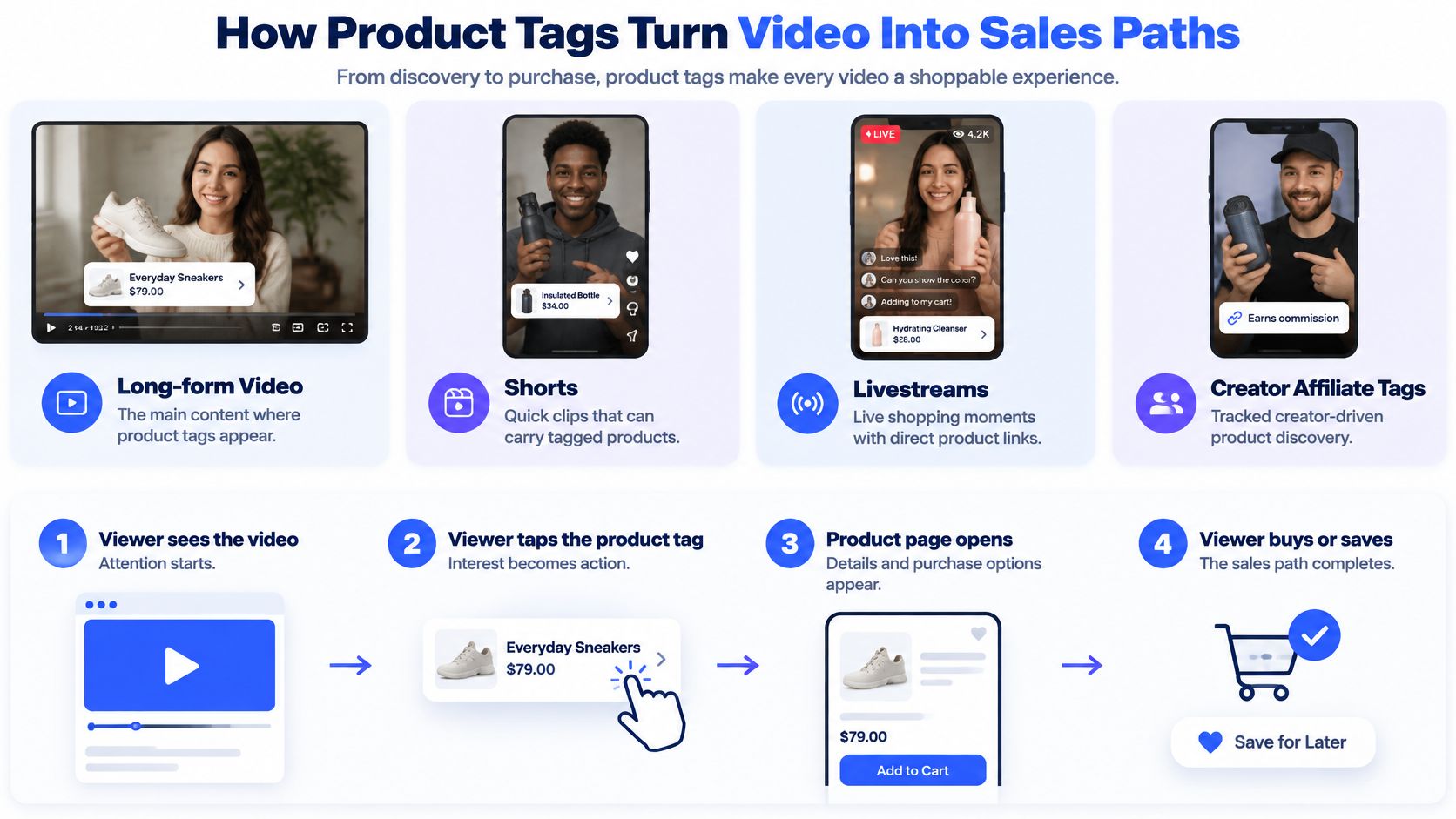
A brand doesn't control what a viewer clicks, but it does control which video formats carry its catalog and how clearly those items appear. Each YouTube Shopping format plays a different mechanical role on screen.
Format | How products appear | Best use |
|---|---|---|
Long-form video | Product tags attached to the video | Reviews, demos and comparisons |
Shorts | Product tags attached to vertical clips | Quick discovery and impulse interest |
Livestream | Products shown during the live broadcast | Launches, drops and Q&A |
Creator affiliate tag | Creator tags products and earns a commission | Scaling reach through many creators |
Think of a product tag like a shelf price label in a retail aisle. The video puts the physical item in the shopper's hands so they can inspect it, while the shelf label tells them exactly what it is, what it costs, and how to check out. If the label points to the wrong SKU, or doesn't match the bottle sitting on the shelf, the shopper walks away.
Here's how those formats connect to the buyer's path on screen.
The Viewer Journey From Screen to Order
When a tag is configured cleanly, a viewer moves from passive watching to a trackable purchase in five steps:
On-screen trigger: The viewer sees your product in frame or hears the creator mention it by name during a demonstration, routine, or comparison.
Timed tag display: A clickable product tag surfaces at that exact moment, keeping attention inside the video player rather than forcing a search.
Product details tap: The viewer taps the tag to inspect pricing, variants, and product details without hunting through the description box.
Integrated checkout: The purchase completes through your connected merchant shopping integration, carrying the viewer smoothly from interest to order confirmation.
Reporting capture: Both the completed order and the originating product tag flow back into your merchant reporting view so your team can audit performance by SKU.
A tag only earns the tap when the item in the frame matches the exact product sitting in your catalog feed.
That alignment requirement trips up more brands than any technical setup error. If a creator films a gift bundle while the attached tag points to a single travel-size item, viewers lose confidence the moment the product card opens.
Matching Each Video Format to the Right Job
Treating every format the same wastes creative budget. Long-form videos do the heavy lifting for consideration because viewers intentionally search for side-by-side comparisons, durability tests, and multi-minute tutorials before buying higher-ticket items.
Shorts work best at the top of the experience for fast discovery and lower-friction products where a single visual hook sparks immediate curiosity. Livestreams shine during seasonal drops, limited-edition launches, and real-time Q&A sessions where answering buyer objections live pushes undecided shoppers over the line. Finally, creator affiliate tags let you scale reach across dozens of niche voices without negotiating separate flat-fee production contracts for every upload.
Requirements Checklist Before You Go Live
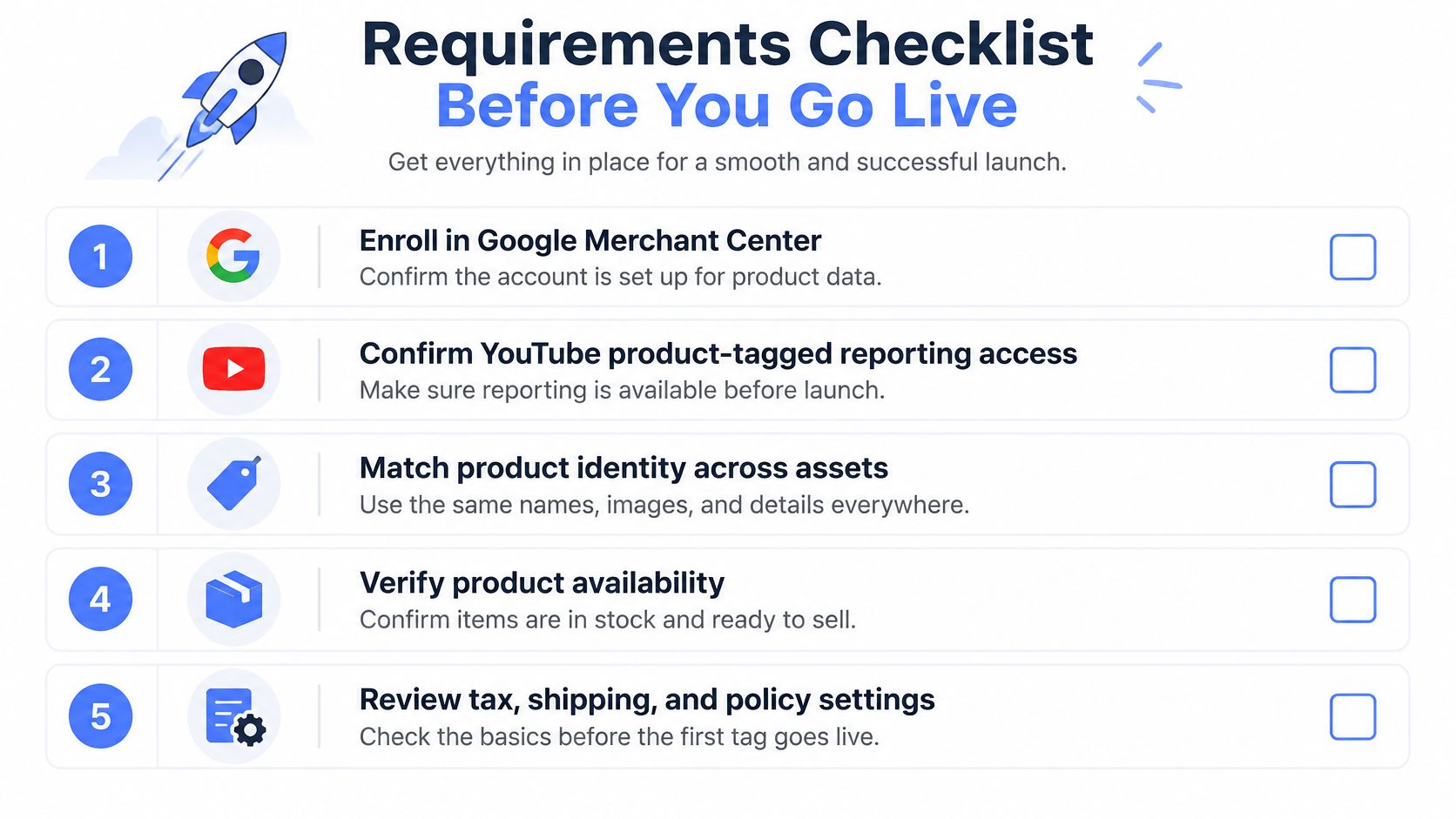
Launching before your backend is ready guarantees messy data and broken shopping moments. Work through these operational steps in order before you brief creators or put paid amplification behind tagged content.
Account and Catalog Foundations
Start with the data layer so every future tag resolves to an active, accurate listing.
Enroll in Google Merchant Center and confirm reporting access: Set up your Google Merchant Center account and verify that it has access to YouTube product-tagged reporting, which Google makes available to merchants enrolled in the YouTube Shopping Affiliate program. Skipping this check leaves your analytics team blind after launch day.
Build a clean, stable product feed: Populate your feed with stable offer IDs, accurate titles, live pricing, verified stock status, and up-to-date tax, shipping, and return policy settings. If offer IDs change every time your store refreshes a seasonal collection, historical tag performance breaks across reporting windows.
Verify your storefront integration: Connect your ecommerce backend and run a live test order. If you operate on Shopify, confirm the Google & YouTube channel integration syncs inventory changes promptly so creators aren't tagging sold-out variants.
Creator Screening and Team Ownership
Once your catalog holds up, lock down the people and governance rules that keep campaigns repeatable.
Screen creators against current eligibility rules: Check every prospective partner against YouTube's current Shopping affiliate documentation inside the YouTube Partner Program before outreach begins. Program thresholds and eligibility policies shift over time, so record each creator's verified status in your outreach tracker rather than relying on assumptions from last year's deck.
Standardize attribution windows and naming conventions: Agree with finance and performance marketing on one attribution window and a strict naming taxonomy for campaigns, product lines, and creator cohorts. Consistency here prevents endless spreadsheet debates when quarterly reviews arrive.
Assign single-threaded owners: Name one person responsible for creative briefs, one for catalog feed health, and one for reporting reconciliation. Brands with active owned channels often pair these workflows with structured YouTube channel management so owned uploads, metadata, and creator partnerships pull in the same direction.
Treat this six-step checklist as the minimum floor before you judge creator performance or scale paid spend. Completing it won't guarantee strong sales on its own, because buyers still respond to the strength of your product, your price, and the creator's credibility.
Matching Creative and Catalog So Tags Land Right
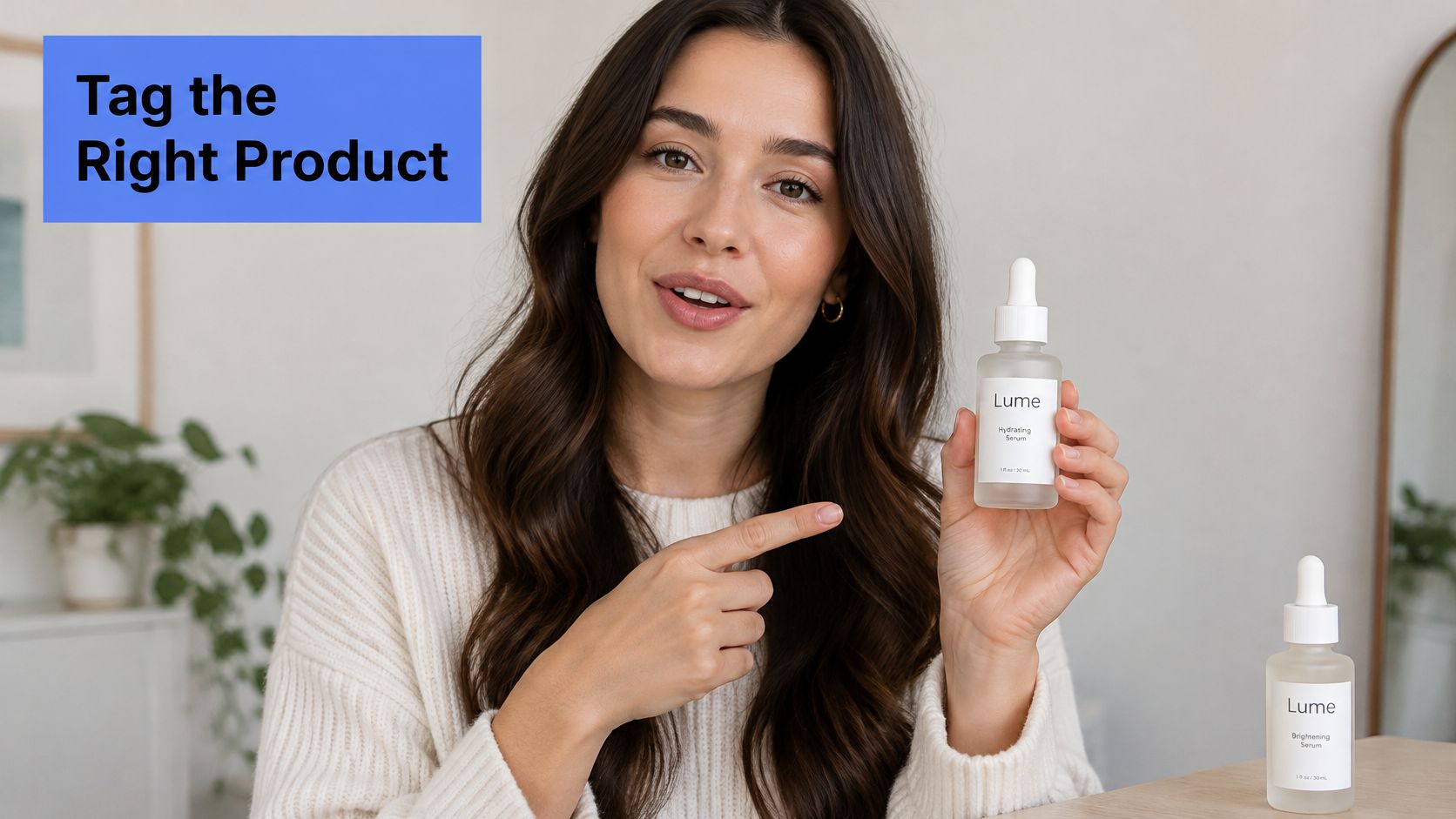
Consider a common launch-day failure. A beauty creator holds up a hydrating serum while talking about a brightening cleanser from the same brand, and the product tag pops up for the wrong bottle. Viewers tap expecting the cleanser they just heard praised, land on a different product page, and close the tab.
The same breakdown happens with variants. Say a headphone brand sells a wireless model in silver, chalk, and midnight. The creator wears the midnight pair throughout a ten-minute desk setup tour, but the catalog feed links the tag to the silver SKU. Even interested shoppers hesitate when the image on the tag doesn't match what's on the creator's head.
Why Machine Tagging Needs Clear Signals
Platform scale has pushed YouTube toward smarter automation. According to the Google India Blog, YouTube Shopping gross merchandise volume (GMV) grew 5x year over year with more than 500,000 creators enrolled globally as of July 2025, and Google introduced AI-assisted tagging that identifies when a product is mentioned and displays the product tag at that moment, with broader automatic product identification planned for eligible items.
Machine-assisted systems rely on clean cues. They look for product identity, visual appearance, and verbal mention all pointing unambiguously to the same catalog entry. When a creator uses a nickname instead of the catalog title, or flashes the bottle for a split second behind a cluttered desk, automated triggers misfire or appear too late.
Keep those macro platform numbers in perspective, too. Strong platform-wide GMV growth signals healthy viewer adoption, not a guaranteed return for every advertiser. Your outcome depends on how tightly your production process connects creative execution with catalog accuracy, especially across large assortments where teams lean on resources like Sprello's guide to catalog workflows to keep titles, variants, and metadata synchronized.
Four Production Rules for Tag-Ready Video
Build these rules directly into every creator brief and studio shot list:
Hold clean product shots in frame: Show the hero item clearly, unobstructed, and well lit for a few uninterrupted seconds right when it's discussed. For multi-SKU catalogs, we film many products in a single production day with consistent lighting and styling so every item looks unmistakable on camera and matches its store photography.
Speak the exact catalog name: Have the creator say the product's actual catalog title at least once during the demonstration rather than relying solely on casual shorthand.
Lock variant and colorway parity: Ship creators the exact colorway, pack size, or bundle mapped to the active offer ID you intend to tag.
Sync scripts with live feed pricing and offers: Review talking points against your Merchant Center feed before filming so mentioned promos, specs, and bundle contents match the destination page.
Teams investing in dedicated ecommerce video production should evaluate those tagged moments against downstream product-page views, clicks, orders, and sales, never video views alone.
First misfire check: Whenever a tag fires on the wrong item or fails to convert, inspect three fields before blaming the creator: verify that the item shown on screen matches the feed's exact offer ID, current price, and live inventory status.
Reading Tagged-Product Metrics Without Guessing
Vanity metrics hide real bottlenecks. A video with high view counts can generate almost no product-page clicks, while a niche review can produce your highest-margin orders. Google Merchant Center's YouTube product-tagged reporting view gives merchants enrolled in the YouTube Shopping Affiliate program a structured product-funnel dataset, including impressions, views, clicks, orders, gross sales, net sales, commissions, conversion rate, tagged-video count, and tagged-creator count, segmented by date and product offer ID.
Metric | What it reveals | Weak value suggests |
|---|---|---|
View-to-click rate | Interest in the tagged moment | Weak creative or tag placement |
Conversion rate | Strength of the offer and checkout | Landing page, pricing or checkout friction |
Impressions | Reach of the product tag | Distribution or creative-reach problem |
Tagged-video and tagged-creator count | Breadth of exposure | Sales depend on too few creators |
Gross sales vs net sales | Revenue before and after refunds | Refunds or reconciliation gaps |
Pairing this merchant view with YouTube Analytics, which surfaces tagged-product engagement and traffic coming from product pages, lets you pinpoint exactly where shoppers drop off instead of guessing.
Running a Weekly Diagnostic Review
Set a recurring weekly review that pulls tagged-product stats segmented by date and offer ID. Start by lining up each SKU's view-to-click rate right beside its conversion rate, then inspect your tagged-video and tagged-creator counts to see whether revenue rests on broad creator adoption or just one or two lucky uploads.
Look at how two opposite diagnostic patterns call for completely different fixes:
High clicks, low conversion: Say an ergonomic office chair earns a strong view-to-click rate across six creator reviews, yet barely closes orders. The creators did their job. Your bottleneck sits on the destination page, such as unexpected shipping fees, unclear assembly policies, an uncompetitive price, or a clunky mobile checkout. Recruiting ten more creators will only pour traffic into a leaky bucket.
High conversion, low impressions: Now suppose a travel coffee grinder converts a strong share of every shopper who clicks, but total tag impressions stay tiny. Here your offer resonates, so the fix is distribution, whether that means briefing more creators, expanding into Shorts cutdowns, or putting paid media behind the highest-converting reviews.
Reconciling Gross and Net Sales
One reporting trap catches marketing teams off guard every quarter: gross sales exclude refunds, whereas net sales incorporate both completed purchases and refund deductions. Reporting gross sales to executive leadership overstates true channel revenue, particularly in apparel, footwear, and electronics categories where return rates swing widely across SKUs.
Compare Merchant Center net sales directly against your ecommerce platform or retailer order records under the single attribution window you locked in before launch. If your site analytics don't line up cleanly with order totals, tightening event hygiene using reliable GA4 revenue tracking for analysts from Trackingplan helps isolate whether discrepancies come from tracking gaps, return lag, or cross-channel overlap.
Close every weekly review with two firm operating habits. Change only one variable per test, whether that's creative hook, landing offer, or creator tier, and never judge a creator on raw view counts alone.
Funnel Stages Where Shoppable Video Fits
"Shoppable" doesn't automatically mean "transactional." Many brands evaluate YouTube Shopping as if every tagged viewer should buy within the same session, then declare the channel unprofitable when direct click-through orders look modest. That expectation ignores how people research products on YouTube.
Industry figures reported by XtendedView highlight the scale of that discovery behavior: YouTube reported that viewers globally watched more than 40 billion hours of shopping-related content during 2025, and survey-based industry reporting found that 61% of U.S. online Gen Z consumers aged 14 to 24 used YouTube to discover brands or products they hadn't previously known. For considered categories like technology, SaaS, consumer electronics, and healthcare, reviews, comparisons, and creator walkthroughs shape purchase intent days or weeks before an order closes on a brand site, in a retail store, or through a sales representative.
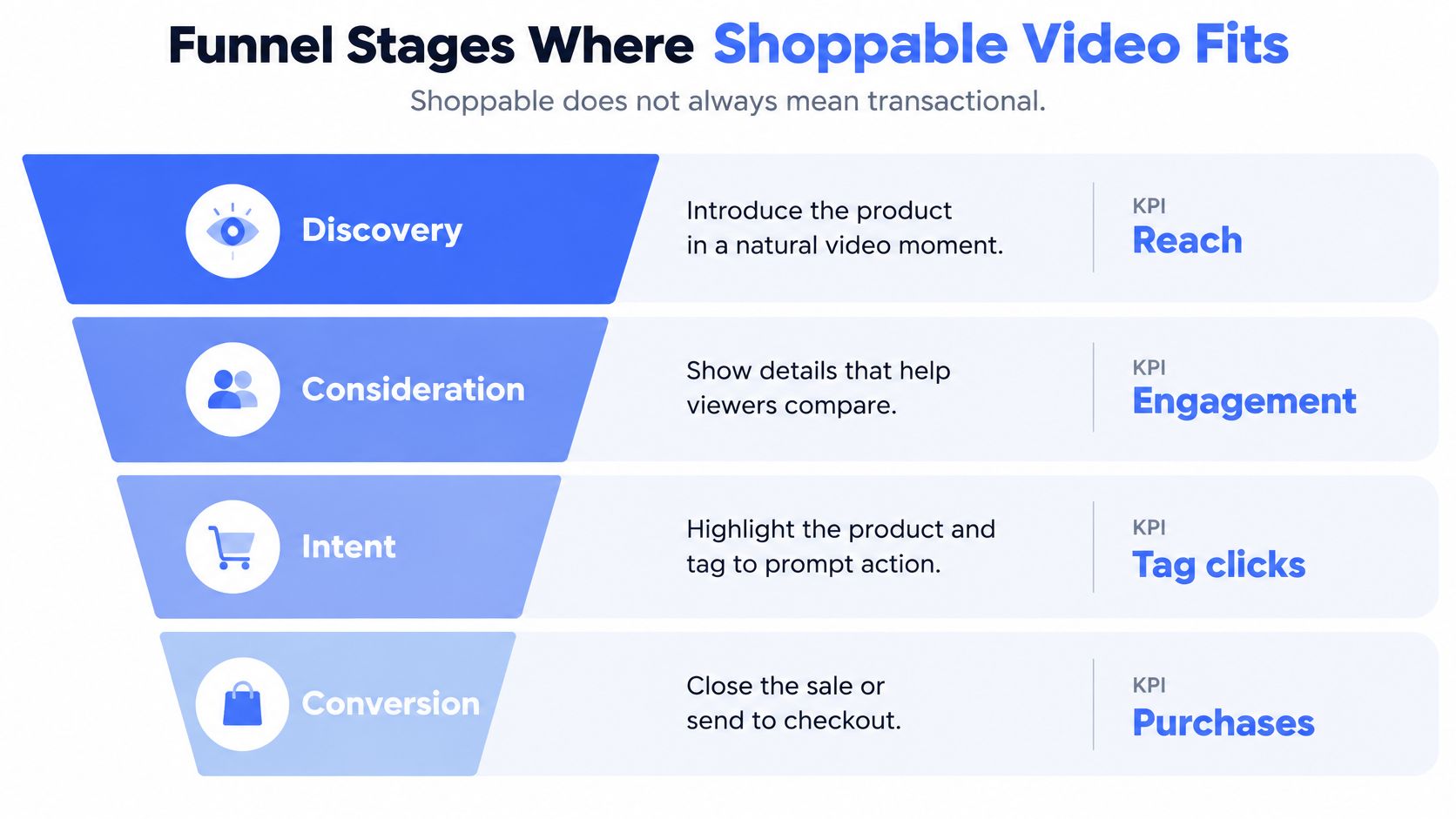
Mapping each video asset to a specific funnel stage keeps your team from grading a discovery video on a checkout KPI.
Funnel stage | Creative role | Primary KPI |
|---|---|---|
Discovery | Introduce the product to new viewers | Qualified traffic and new-customer penetration |
Evaluation | Comparisons and demonstrations | Product-page engagement |
Proof | Reviews, results and customer stories | Lead quality and branded search lift |
Retargeting | Reminders for viewers who did not act | Post-view conversions and assisted revenue |
Conversion | Offer and product tag | Orders and net sales |
How a Long Consideration Cycle Actually Plays Out
Say a B2B workflow software company partners with a productivity creator to publish an in-depth walkthrough. Viewers encountering the tool for the first time sit in Discovery, so the brand measures qualified traffic and new-customer penetration rather than expecting instant enterprise upgrades.
Mid-funnel prospects watching a head-to-head comparison against two legacy competitors sit in Evaluation, where deep product-page engagement signals genuine buying intent. When the brand follows up with a customer implementation breakdown for Proof, the right signals are branded search lift and lead quality entering the sales pipeline.
Next, Retargeting clips remind non-converting viewers of a key time-saving feature, capturing post-view conversions and assisted revenue even when those buyers later book a demo directly on the brand website. Finally, Conversion assets pair a clear commercial offer with the product tag, where orders and net sales belong front and center.
Picking the Stage for Your First Video
If you're launching your first shoppable video with limited budget, start at Evaluation. A clear demonstration or side-by-side comparison captures viewers who already feel the problem your product solves, giving you a fair read on both product-page engagement and downstream conversion before you spend heavily on broad top-of-funnel reach.
Run a Holdout Test Before You Scale Creator Spend
Here is the uncomfortable truth most affiliate tutorials skip: a YouTube Shopping campaign can report impressive GMV while generating almost zero net-new demand. If creators mainly tag products to audiences who were already searching your brand name, already sitting in your retargeting pool, or already planning to buy from a retailer this week, your commissions are subsidizing baseline sales instead of expanding the business.
According to Google's YouTube Shopping Merchant Center documentation, native reporting tracks sales, GMV, views, engagement, subscribers, commissions, and tagged-product performance, but it does not establish incrementality, assisted conversions, cross-device journeys, or reconciliation with CRM and retailer sales data. Because creator uploads frequently overlap with paid YouTube ads, YouTube search, Shorts, and retail-media placements in the same customer journey, a dashboard alone can't prove causation.
A holdout test answers the question dashboards avoid: did the exposed group buy more than a comparable group that never saw the tagged videos?
Six Steps to Measure True Incremental Lift
Design a controlled incrementality test before committing major annual creator spend:
Pick one hero product and one controlled creator cohort: Narrowing the test to a single SKU and a defined group of partners prevents multi-product noise from blurring the read.
Hold back a comparable control group: Reserve either a matched geographic region or a comparable set of creators and product lines that receive no tagged video exposure during the test window.
Freeze the attribution window before launch: Lock your measurement rules in writing before the first upload goes live so nobody shifts lookback dates mid-test to rescue weak numbers.
Track business-level unit economics, not just GMV: Measure new-customer rate, blended CAC, post-view conversion lift, and contribution margin after commissions across exposed versus holdout segments.
Run through a full purchase cycle: Give the test enough calendar time to cover how long your buyers normally take to research and buy in your category, avoiding premature calls after a single launch week.
Compare exposed and holdout outcomes cleanly: Isolate the net lift above your holdout baseline and calculate whether that incremental margin justifies creator fees, commissions, and production costs.
Privacy Limits and Scaling Decisions
YouTube allows creators to share aggregated channel, audience, and shopping-performance insights with advertisers in a privacy-safe manner. Those aggregated metrics help you spot strong partners and diagnose creative resonance, yet they aren't user-level attribution. Your holdout design carries the actual causal proof.
Budget rule: Scale creator spend only when incremental lift survives the holdout comparison; if lift stays flat, fix the offer, landing experience, or creative before buying more reach.
When brands coordinate creator cohorts alongside paid video and owned channel growth, working with an experienced influencer marketing agency keeps briefing, testing, and reporting under one roof. At Busylike, our YouTube Management service includes custom thumbnails, optimized video layouts, cohesive channel branding, video SEO and metadata setup, and channel health audits, and ecommerce video pricing depends on scope, so clients share their project details to receive a scoped estimate.
Prove the lift first, earn confidence from your finance team, and then expand your creator roster knowing every commission dollar buys real growth.
If your team wants to build a YouTube Shopping program that connects clean product demos, creator partnerships, and rigorous incrementality testing, Busylike plans, produces, and optimizes ecommerce video and YouTube channels from concept to measurable sales. Share your catalog goals and campaign scope with our New York City team at Busylike to map out a practical plan for your next launch.