
Advertising on Hulu: Formats, Costs and How to Buy

Hulu's U.S. advertising revenue was projected at roughly $180 million for 2009, an estimate that put it approximately level with YouTube's projected domestic ad revenue for the same year, despite a far smaller overall audience, as Streaming Media's advertising year in review recorded. Premium, professionally produced television sold that attention then. It still does.
What's changed is the machinery around it. Hulu sits inside Disney's advertising stack, its inventory is bought through more routes than it used to be, and the report at the end of a flight is both richer and easier to misread. Formats, buying paths and CPMs are learnable in an afternoon. Frequency and measurement are the two problems that decide whether the money worked.

Both problems have concrete answers, and the first step is knowing exactly what you're buying.
Table of Contents
Choosing Between Disney and a DSP - Three questions that settle the choice
What Hulu Ads Cost and Why Rates Vary - The arithmetic behind a CPM - What moves the rate
Hulu Creative Specs Your Video Must Meet - Why each row exists - Production habits that survive review
Frequency, Fatigue and Creative Sequencing - Household frequency is not person frequency - A sequence that resists fatigue
Measuring Hulu Results Without Overclaiming - What closed-loop measurement actually adds
Hulu Ad Formats at a Glance
Advertising on Hulu means placing a message inside a premium, professionally produced viewing environment, and the ad-supported tier is where that audience concentrates. The format you pick decides what a viewer can do in the moment your brand appears, so start with the action you need rather than the length you can afford.
Hulu sells four units that matter to most advertisers.
Format | Where viewers see it | What the viewer does | Best campaign goal |
|---|---|---|---|
Standard video spot (15 or 30 seconds) | Ad breaks before, during and after shows | Watches passively | Reach and brand awareness |
Pause ad | While the viewer has paused playback | Glances at the ad during a pause | Low-intrusion awareness |
Binge ad | Between episodes in a binge session | Watches before the next episode | Repeat exposure to a series audience |
GatewayGo | Interactive ad on the living-room screen | Requests info or an offer by push notification, email or QR code on a second screen | Lead generation and offers |
The standard spot is the workhorse. It runs in a break, the viewer can't skip it, and its job is memory: a face, a product, a line people repeat. Everything else in the set is a variation on how much attention the viewer is already giving the screen.
Pause ads catch someone mid-scene, remote in hand, deciding whether to refill a glass. Binge ads catch the opposite mood, a viewer committed to three more episodes and open to a brand that pays for the next one to start on time.
Plan by action, not by inventory. If the goal is awareness, buy the standard spot and spend your effort on reach and frequency control. If the goal is a response, the interactive unit is the only one in the set built to capture it.
GatewayGo was designed as an interactive extension of a traditional living-room video ad, letting viewers request additional information or an offer on a second-screen device through a push notification, an email or a QR-code scan, per Amazon Ads' overview of the Disney Advertising integration. The design brief was to let audiences act while remaining minimally intrusive during the viewing experience, which is what separates it from a standard pre-roll or mid-roll spot.
That handoff matters if your funnel ends in a demo request rather than a purchase. ContentBuck's guide to turning video views into demo requests covers the plumbing on the other side of the scan, from landing page to routed lead, which is where most interactive campaigns lose their advantage.
Choose the format by the action you need. Passive awareness for reach, interactive response for leads. Most wasted Hulu budget comes from buying one and expecting the other.
Choosing Between Disney and a DSP
The first buying decision isn't creative, budget or audience. It's the path, because the path sets your minimums, your lead times and what you can measure at the end.
Disney points advertisers to Disney Campaign Manager as the fastest route to buy Hulu and Disney+ inventory directly, describing it as a self-service streaming-TV buying tool that lets you set up, launch and optimize campaigns in one interface, according to Disney Advertising's contact and platform information. That creates a different path from working with Disney's managed sales organization or reaching Hulu inventory through a third-party demand-side platform.
Disney's managed sales team handles what the self-service tool can't package neatly: custom sponsorships, multi-format flights, upfront-style commitments and bundles that stretch across Hulu, Disney+ and ESPN. The trade-off is time. Deals are relationship-led, negotiated and slower to launch, which is fine for a brand planning a year ahead and painful for one with a six-week window.
DSP access is the third route, and it's the one that fits teams already running programmatic media. Amazon Ads and Disney Advertising announced a strategic integration giving advertisers direct access to Disney premium inventory across Hulu, Disney+, and ESPN, positioned around combining Amazon and Disney insights for audience relevance and commerce-oriented measurement, as coverage of the Amazon DSP and Disney integration describes. Availability and campaign terms depend on the integration and market, so confirm them before you promise a client a launch date.
Buying path | How access works | Best fit | Main trade-off |
|---|---|---|---|
Disney Campaign Manager | Direct, self-service in one interface | Fastest route for Hulu and Disney+ buys | You run setup, launch and optimization yourself |
Disney managed sales | Through Disney Advertising's sales team | Large custom deals and packages | Slower, relationship-led process |
Amazon DSP | Hulu inventory through a DSP relationship with Disney premium inventory | Teams already buying programmatically on Amazon | Availability and terms depend on the integration and market |
Other third-party DSPs | Hulu inventory where the DSP has access | Teams standardizing CTV buying across platforms | Confirm availability, fees and data terms first |
Three questions that settle the choice
Ask how many campaigns your team will run this year. A brand running eight small flights wants self-service speed. A brand running two flagship pushes wants managed packaging.
Ask whether DSP seats, workflows and reporting already exist. If your programmatic team buys display and online video every week, adding Hulu inventory to the same workflow costs you almost no process. If nobody on staff has logged into a DSP, Campaign Manager is the shorter road.
Ask how much control over inventory and measurement you need. Then ask each path which audience signals it can activate, because Disney's Audience Graph is the identity layer behind much of Disney's targeting and retail-data matching. A route that can't reach it limits the audiences you can build.
Say a retailer already runs Amazon DSP for sponsored products and streaming audio. Adding Hulu to the existing programmatic plan keeps one reporting spine and one optimization cadence. A consumer brand launching one seasonal product, with no programmatic staff, is better served by Campaign Manager and a single well-built flight. When you do standardize CTV buying across platforms, this primer on programmatic video advertising explains how the buying mechanics compare.
What Hulu Ads Cost and Why Rates Vary
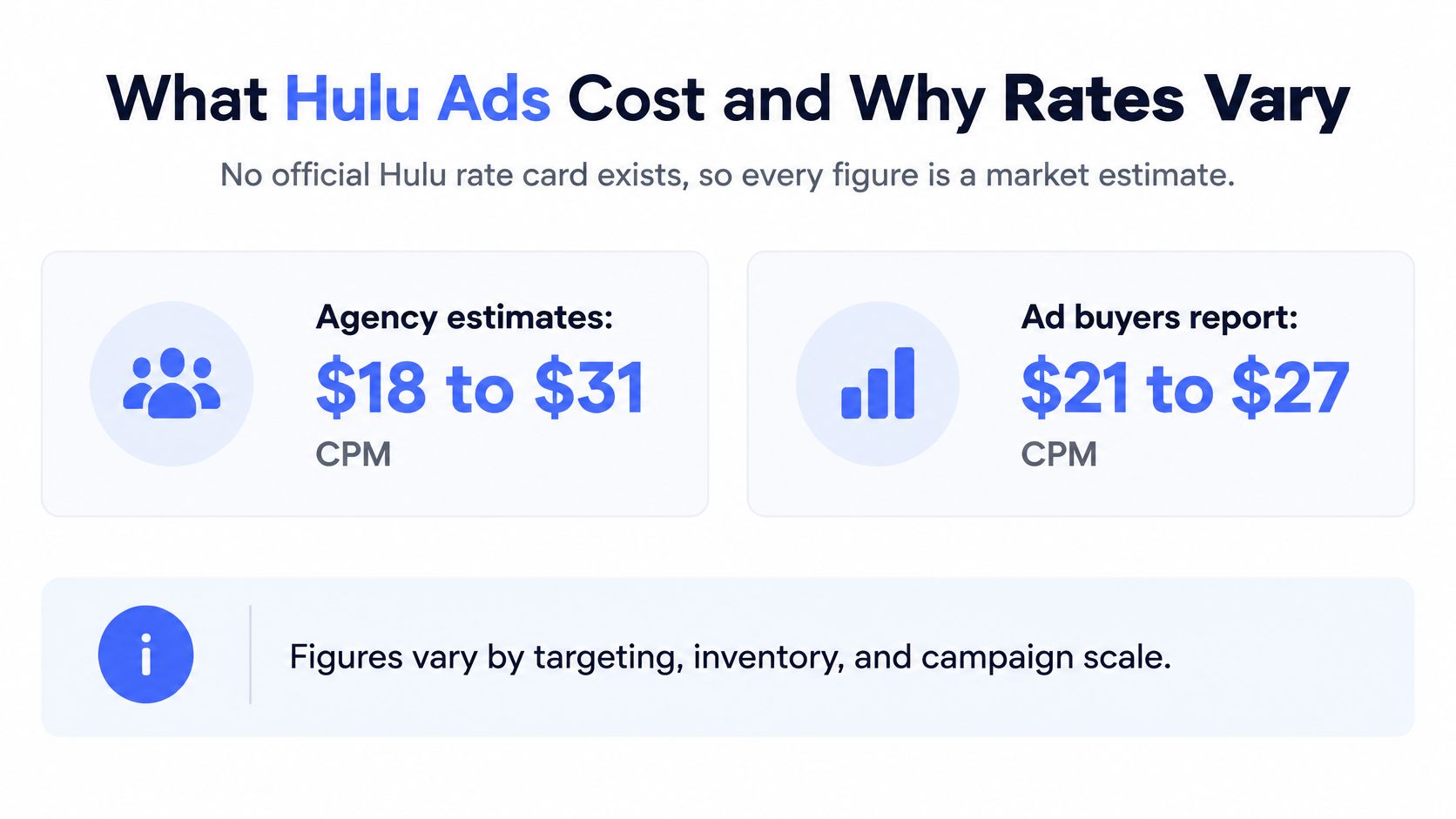
No official Hulu rate card exists. Every figure you will read about Hulu pricing is a market estimate assembled from agency and buyer reporting, so treat each published number as a negotiating reference rather than a published price.
Those estimates cluster in a fairly narrow band: broad national buys tend to price in the $20s per thousand impressions, while narrow targeting stacks and premium placements push toward the low $30s. The overlap between buyer and agency estimates is where most deals land, which is why two reports can quote different ranges and still describe the same market.
The arithmetic behind a CPM
CPM means cost per thousand impressions: the price of 1,000 delivered ad views, and the only way to compare Hulu with any other channel on your plan.
At $25 CPM, 100,000 impressions cost $2,500 before fees and production. At $30 CPM, the same 100,000 impressions cost $3,000. Scale that to a quarter of a million impressions and the choice is roughly $6,250 versus $7,500 for identical reach, which is why a few dollars of CPM movement deserves a conversation rather than a signature.
Price is only half the equation. As ad loads on the service have grown, each commercial break carries more spots, more competing messages sit around yours, and viewer patience per ad shrinks. A cheaper CPM inside a crowded pod can cost more attention than a pricier spot with room around it.
What moves the rate
Targeting precision: a national broad buy prices lower than a narrow age, geography and interest stack that thins the audience.
Inventory and content: premium placements around high-demand programming carry more than general run of service.
Spot length and format: 15s and 30s price differently, and interactive or sponsorship units sit above a standard spot.
Deal structure and season: committed volume buys beat one-off flights, and the end-of-year window is the most contested of the year.
Route to market: direct and DSP purchases carry different fees, minimums and data terms.
Ad pricing also moves with the platform's own economics. Hulu's SVOD-only average monthly revenue per paid subscriber declined from $12.52 to $12.36 in the quarter ended March 29, 2025, primarily because of lower advertising revenue, per The Walt Disney Company's quarterly results. When ad revenue per subscriber shifts enough to move that line, supply and pricing are live variables rather than fixed inputs, and a buyer who knows it negotiates differently.
Ask before you sign: What ad load does this quoted CPM assume, what format mix does it include, and what targeting is baked into the price? A rate missing those three answers is an opening offer, nothing more.
Hulu Creative Specs Your Video Must Meet
Hulu creative is a broadcast asset. A social cutdown with the bars removed fails review, and the failure usually lands in launch week when there's no time to fix it.
The workflow that avoids this: build one broadcast-quality 16:9 master first, then derive every platform version from it while keeping identical duration, audio synchronization and brand cues.
Parameter | Preferred setting | Accepted or notes |
|---|---|---|
Frame size | 1920×1080 | Nonstandard raster sizes risk rejection |
Aspect ratio | 16:9 | Keep a 16:9 master for every version |
Scanning | Progressive | Progressive scanning is listed in published specs |
Frame rate | Constant frame rate | Hold the same rate from edit through export |
File format | MOV or MP4 | Apple ProRes 422 HQ preferred in one spec set; H.264 accepted |
Video bitrate | About 10 to 40 Mbps | Excess compression reduces legibility |
Audio | PCM or AAC | Audio duration must match video duration |
Those are the delivery requirements published for connected-TV inventory, which list 1920×1080 as the preferred frame size, a 16:9 display ratio, progressive scanning, constant frame rate and MOV or MP4 delivery, with Apple ProRes 422 HQ preferred in one specification set and H.264 accepted, per Tinuiti's CTV specification guide. Listed bitrates range from roughly 10 to 40 Mbps, with PCM or AAC audio and audio duration matching the video.
Why each row exists
Every line in that table prevents a specific failure. A nonstandard raster size triggers rejection or a transcode that softens the picture. Inconsistent frame timing produces judder on a large panel. Mismatched audio duration drifts out of sync in the final seconds, which is exactly where your call to action sits. Heavy compression turns small on-screen legal text into gray mush on a 50-inch screen.
Production habits that survive review
Respect television-safe margins. Keep titles and logos inside the safe area so overscan on different devices doesn't crop your brand name.
Mix dialogue for intelligibility. The room has a soundbar, a partner talking and a phone in someone's hand. If the message only lands with captions, it doesn't land.
Give the spot one action. A single spoken call to action, plus a visible logo early, beats three messages competing for the same 30 seconds.
Validate before trafficking. Run the technical check against the spec table the day the master is approved, not the day the flight starts.
If you're briefing an outside team, Moonb's list of commercial video production companies is a reasonable starting point for vetting partners before you hand over a broadcast master.
Final export checklist: 1920×1080, 16:9, progressive, constant frame rate from edit through export, MOV or MP4, bitrate inside the accepted range, audio track matched to video length, titles inside safe margins. Nothing on that list is creative. All of it decides whether the creative airs.
Frequency, Fatigue and Creative Sequencing
Hulu's reach doesn't automatically become your reach. 71% of Hulu subscribers believed the platform showed too many commercials, the highest negative sentiment among measured services, while nearly 70% of Hulu subscribers use the ad-supported tier, according to Parks Associates' state of streaming research reported by The Desk. High ad-tier usage and high ad annoyance are both true at once.
The same research shows viewers aren't hostile to advertising in principle. 68% said they'd rather save money with ads than pay more to avoid them, and only about one in eight said they couldn't tolerate ads at all.
That gap is the whole planning problem. Viewers accept advertising and resent repetition. Your campaign is on the wrong side of that line when it keeps paying to reach the same households.

Household frequency is not person frequency
A connected-TV device is shared. When your report says a household saw the spot four times, a family of four may have produced twelve impressions and one annoyed parent, or twelve people may have seen it once each. Treat household frequency as a ceiling and plan against a person-level target you can defend. Otherwise your cap does nothing while your CPM climbs.
A sequence that resists fatigue
Rotate assets rather than repeating one. Run a 15-second version for frequency and a 30-second version for the first exposure, then let the short spot carry the repetition. Suppress households that already converted, because paying to re-sell to a buyer is the simplest waste to eliminate. Move exposed households to a different message after a set number of views, a proof point or an offer rather than the same opening line.
Watch four signals by exposure band: completion rate, branded search, site visits and incremental reach. When completion and incremental reach both flatten, the next impression is buying annoyance. That's the moment to rotate creative or stop, and it's also where video retargeting decisions should be made deliberately rather than left on autopilot.
The mechanics of sequencing multiple assets across a flight are easier to see than to describe.
No published threshold tells you how many impressions are too many, so answer it with a method. Set a test cell with two or three exposure bands, hold creative constant for the first week, then compare completion and incremental reach across bands. If band three adds nothing over band two, your cap is somewhere between them.
Measuring Hulu Results Without Overclaiming
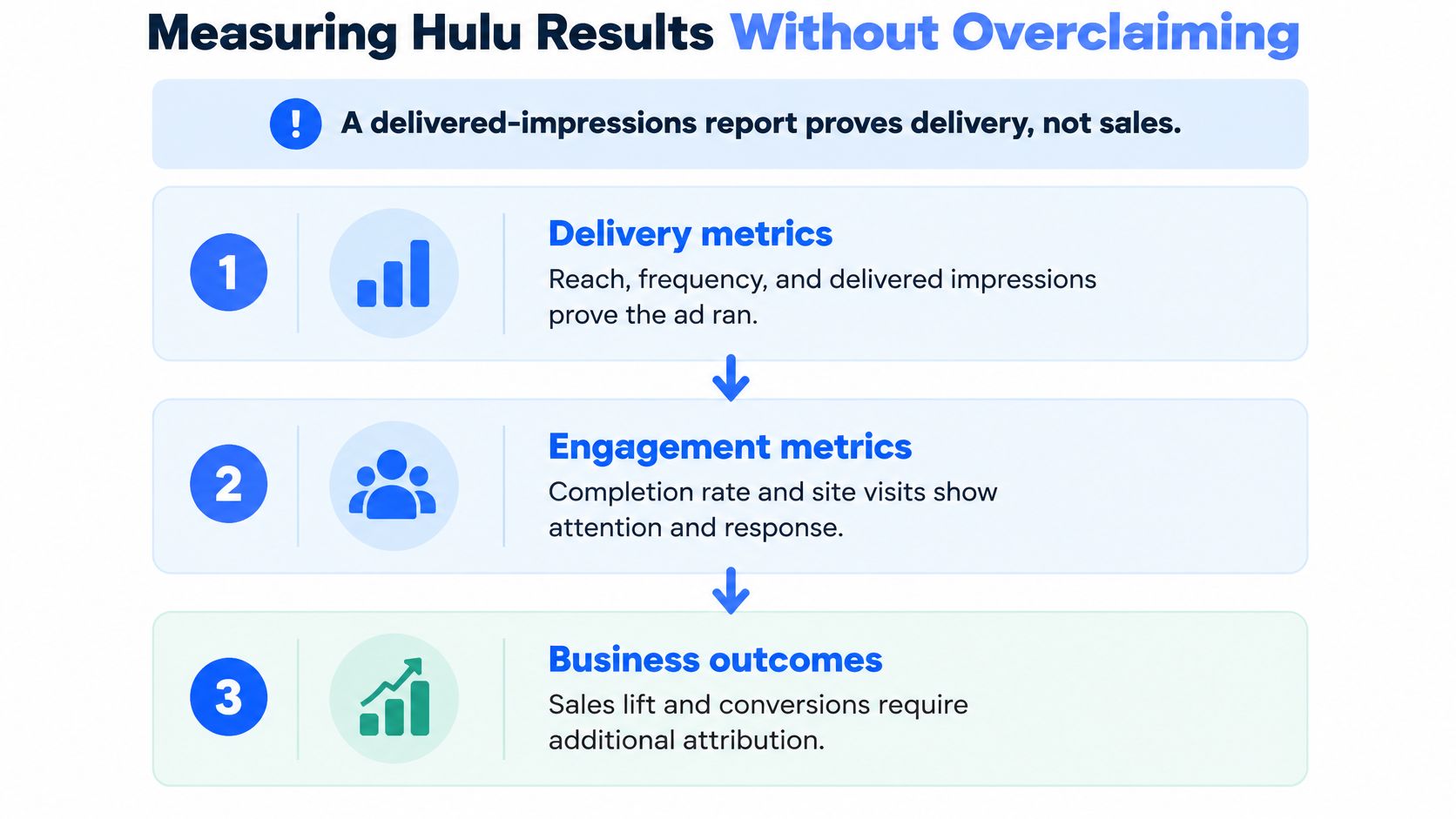
A delivered-impressions report proves delivery. It doesn't prove sales, pipeline or causality, and the temptation to read it as proof grows as ad-supported streaming becomes the default. 46% of U.S. streaming subscribers paid for ad-supported tiers in 2025, and 86% of subscribers offered an ad-supported option had accepted it, according to eMarketer's analysis of streaming growth driven by ad tiers.
Build the evidence in three layers, each one earning the right to the next.
Delivery metrics. Reach, frequency, completion and viewability confirm the ad ran in front of the intended audience. Necessary, never sufficient.
Behavioral signals. Site visits, branded search and retailer-page activity show whether interest moved after exposure. These are directional, and they respond fast enough to steer a live flight.
Causal outcomes. Holdouts, geo experiments or platform-supported brand-lift studies answer whether the ad caused the result. Slower, costlier, and the only layer a CFO should trust.
What closed-loop measurement actually adds
Disney Advertising's collaboration with Walmart Connect applies Walmart's omnichannel purchase data to campaigns across Disney's streaming portfolio, including Hulu, through a privacy-preserving clean-room connection to Disney's Audience Graph, as Disney Advertising's announcement explains. An advertiser defines an audience from first-party streaming and retail signals, activates media, then compares exposed households with downstream purchase behavior, without exchanging raw personal data.
It's strongest for retail, consumer electronics and categories with addressable transaction data. It's weaker where purchases happen offline or through fragmented distribution. Co-viewing on a shared screen complicates person-level attribution no matter how good the clean room is.
What the report proves: matched purchases are not incremental purchases. Specify the conversion window, the geography, the control method, and whether you're buying matched purchases, lift or return on ad spend before the campaign starts, not after.
Two cautions. Hulu can shape consideration before a later search, a direct visit or a purchase somewhere else, so last-click reporting will undercount a campaign that worked. And a high completion rate on a non-skippable format proves the ad was seen, not that it persuaded anyone. Keep cross-channel reporting consistent by reusing one structure, and this monthly social media reporting template from Wojo Media is a workable model to adapt for streaming.
Is Hulu the Right Channel for Your Brand
Hulu has operated at national scale for years. It reported more than 17 million total U.S. subscribers at the end of 2017, an increase of more than 5 million or over 40% from the previous year, and advertising revenue surpassed $1 billion for the first time in its history that year, per Hulu's 2017 announcement. That combination of paid access, premium programming and commercial inventory established the channel as a material national buy rather than an experimental extension of television.
The market around it is contested. 33% of brands and agencies reported placing ads on Hulu in Q1 2025, down from 36% in Q1 2024, according to Digiday Research on ad-supported streaming. Budgets are shifting within streaming, and inventory availability moves with them.
Where does that leave a verdict? Hulu fits brands that need premium, broadcast-style reach and have a way to measure intent afterward. It fits poorly in two situations: a budget too small to support frequency control, where a thin flight buys noise rather than reach, and a team with no capacity to produce broadcast-standard video or brief an outside studio. The channel rewards preparation and punishes improvisation.
Treat Hulu as one line inside a connected-TV plan rather than the plan itself, and the strategic question gets easier. This explanation of what CTV advertising includes is useful for framing that wider view.
Three self-checks before you commit. What must this campaign achieve, awareness, consideration or a measurable response? How much budget can you put behind frequency control, because reach without a cap is just repetition? And what measurement can your team run, a holdout, a geo test, or a dashboard review?
Confirm Your Hulu Plan Before You Commit
Confirmation on Hulu runs in a fixed order. Each answer feeds the next step, and a skipped question resurfaces later, usually at trafficking time when fixes cost days instead of minutes.
Name the action. Decide what a viewer should do after seeing the spot. That answer determines the format, the frequency target and the metric you defend at the end.
Pick the format from the table. Standard spots for awareness, pause and binge units for low-intrusion repetition, GatewayGo when you need a captured response.
Choose the buying path. Weigh Disney Campaign Manager's self-service speed against a DSP's existing workflow, then confirm inventory availability and terms in writing.
Get the assumptions in writing. Ask for the CPM basis, the ad load the quote assumes and the targeting it includes. Without those three numbers, two quotes for Hulu inventory are not comparable.
Build and validate the master. Produce a 16:9 broadcast-quality file and check it against the spec table before trafficking, not after. A rejected file delays the flight, not just the edit.
Write the measurement brief. Fix the conversion window, the control method and the reporting metric before launch, and state plainly which layer of evidence you'll present at the end.
Outside help makes sense in two cases: a team without in-house CTV production capacity, or a team that wants creative and buying under one roof. Busylike manages advertising and channels across YouTube, connected TV and streaming apps, plus paid social and host-read podcast placements, and adapts each production into platform-ready formats for social, mobile, YouTube, CTV and out-of-home.
The single decision for this week is smaller than a media plan. Pick the buying path and approve the creative spec checklist, both before anyone opens an editing timeline.

Hulu rewards the brands that arrive with a format matched to the action they want, a buying path that fits their team, and a measurement design they can defend in a board meeting. Busylike runs CTV advertising end to end, producing the spots those campaigns need and building multiple hooks, lengths and formats per concept so creative can be refreshed before frequency turns into fatigue. Visit Busylike to plan the format, the buy and the measurement together rather than one at a time.

