
Small Business Video Production That Actually Converts

Updated: Sep 6
You've reopened the video brief for the third time. The concept is fine, the product is ready, and someone has already saved a folder of reference clips. Yet nobody can answer the question that determines whether the project will generate demand: where will this video run?
That question should come before the camera, script, or production quote. Small business video production works when the team treats video as a distribution decision first and a production decision second. The channel determines the format, the format determines the script, and the script determines what you need to capture.

Table of Contents
Why Most Small Business Video Plans Stall Before They Ship - Production starts before the buyer and funnel stage are clear - The brief becomes a shot list instead of a distribution plan - The channel-fit test gets skipped
The 2026 Video Market and What It Means for Your Budget - What the performance data changes
Planning a Video That Fits the Channel - Use the two-words-per-second rule - Shoot for repurposing without compromising the original
DIY, Hybrid, or Agency, How to Choose Without Overthinking It - DIY keeps the feedback loop short - Hybrid puts specialists on the bottleneck - Agency support makes sense when the risk is high
Where AI Production Helps and Where It Hurts Your Credibility - Give AI the repetitive work - Protect the moments that carry trust
YouTube, Social, and CTV, Picking the Right Home for Each Video - YouTube builds depth and discoverability - Social wins discovery and speed - CTV earns attention, not clicks
Your 90-Day Video Plan and the Metrics That Prove It Worked - Days 1 through 30, ship and learn - Days 31 through 60, distribute and measure - Days 61 through 90, cut losers and fund winners
Why Most Small Business Video Plans Stall Before They Ship
Most stalled projects begin with a camera and a vague concept. The team says it wants “a brand video,” “some social content,” or “an explainer,” then starts collecting footage without defining the buyer, the funnel stage, or the placement. The result is usually a polished file sitting in Google Drive with no clear audience or campaign attached to it.
Three planning mistakes create most of that waste.
Production starts before the buyer and funnel stage are clear
A customer who's discovering your business needs a different message from a prospect comparing vendors. An existing customer learning a product feature needs something different again. If the team doesn't decide whether the video is for awareness, consideration, conversion, onboarding, or retention, the script tries to serve everyone and persuades no one.
A local service business might need a fast problem-and-solution clip for discovery. A software company might need a product demonstration for a sales-qualified prospect. A healthcare brand may need a human-led explanation that builds confidence before it asks for an appointment. Those are different jobs, not different edits of the same job.
The brief becomes a shot list instead of a distribution plan
A shot list tells the crew what to film. A useful brief also tells the media buyer where each asset will appear, what action the viewer should take, and how success will be judged.
Practical rule: If the channel and KPI aren't written on page one, the brief isn't ready for production.
A 30-second vertical clip for Instagram Reels and a 90-second YouTube pre-roll aren't interchangeable. The vertical clip needs immediate visual movement, readable captions, and a hook that survives a fast scroll. The pre-roll can develop a fuller argument, but it still needs early brand recognition and a clear next step.
The channel-fit test gets skipped
The destination controls the practical details. Aspect ratio affects framing. Placement affects duration. Audience intent affects the opening line. Audio behavior affects captions and sound design. A team that shoots one wide master and promises to crop later often loses faces, products, text, or the visual context that made the shot useful.
Treat the project as a placement problem. Decide whether the first home is YouTube, social, a landing page, email, or CTV. Then build the production around that home and capture additional versions only when the budget and schedule justify them. The rest of your small business video production system should follow that decision, from scripting through measurement.
The 2026 Video Market and What It Means for Your Budget
A small business can shoot a polished video and still waste the budget if the asset has no clear distribution plan. The market now rewards teams that decide where a video will run, what job it must do, and how often they can produce it before choosing cameras, crews, or effects.
Video is now part of the baseline marketing mix. In 2026, 91% of businesses use video as a marketing tool, compared with 86% in 2024 and 61% in 2016, according to Wyzowl's 2026 video marketing statistics summary. The same summary reports that 59% of businesses create video in-house, 32% use a hybrid model, and 10% rely exclusively on outside vendors. It also states that 46% of marketers allocate a third of their budget or less to video content, while 92% plan to spend the same amount or more in 2026.
For a small company, those figures support a practical model: keep recurring, channel-specific production in-house; bring in specialists for shoots, edits, or campaigns your team cannot deliver consistently. Set the publishing cadence and channel mix first. Then set the production tier.
What the performance data changes
Video earns its place through a measurable action, not visual polish alone. Mack Media Group's small-business video ROI summary reports that 93% of marketers say video delivers positive ROI and 82% say video marketing gave them a good ROI in 2026. The same source reports that landing pages with video can convert up to 86% better than text-only pages.
Use that evidence to assign each asset one job. A service explainer should answer a buying question. A product demo should remove a specific objection. A testimonial should support a decision already under consideration. A cinematic montage can support brand recall, but it needs a defined destination and distribution budget.
Production costs now support more than one workable tier. The cited research reports that median finished-video production cost fell from $4,200 to $2,500, and that 42% of marketers spend under $500 per video production. Those figures appear in Mack Media Group's video marketing ROI research. They do not justify cutting every corner. They support matching production effort to the channel, audience intent, and expected shelf life.
Production Model | Cost Range | Best For | Typical Turnaround |
|---|---|---|---|
Lean internal workflow | Under $500 per video, according to the cited industry research | Frequent social cuts, simple explainers, internal expertise | Fast, once the team has templates |
Hybrid production | Varies by scope and specialist involvement | Recurring content with professional shooting or editing support | Moderate |
External production partner | Varies by concept, crew, and post-production needs | Hero campaigns, complex demos, and high-stakes brand work | Longer, with more approvals |
Use digital video production workflows for modern marketing teams to connect production tasks with planning and delivery. A budget should buy a repeatable system, not one impressive file that never reaches the right audience.
Planning a Video That Fits the Channel
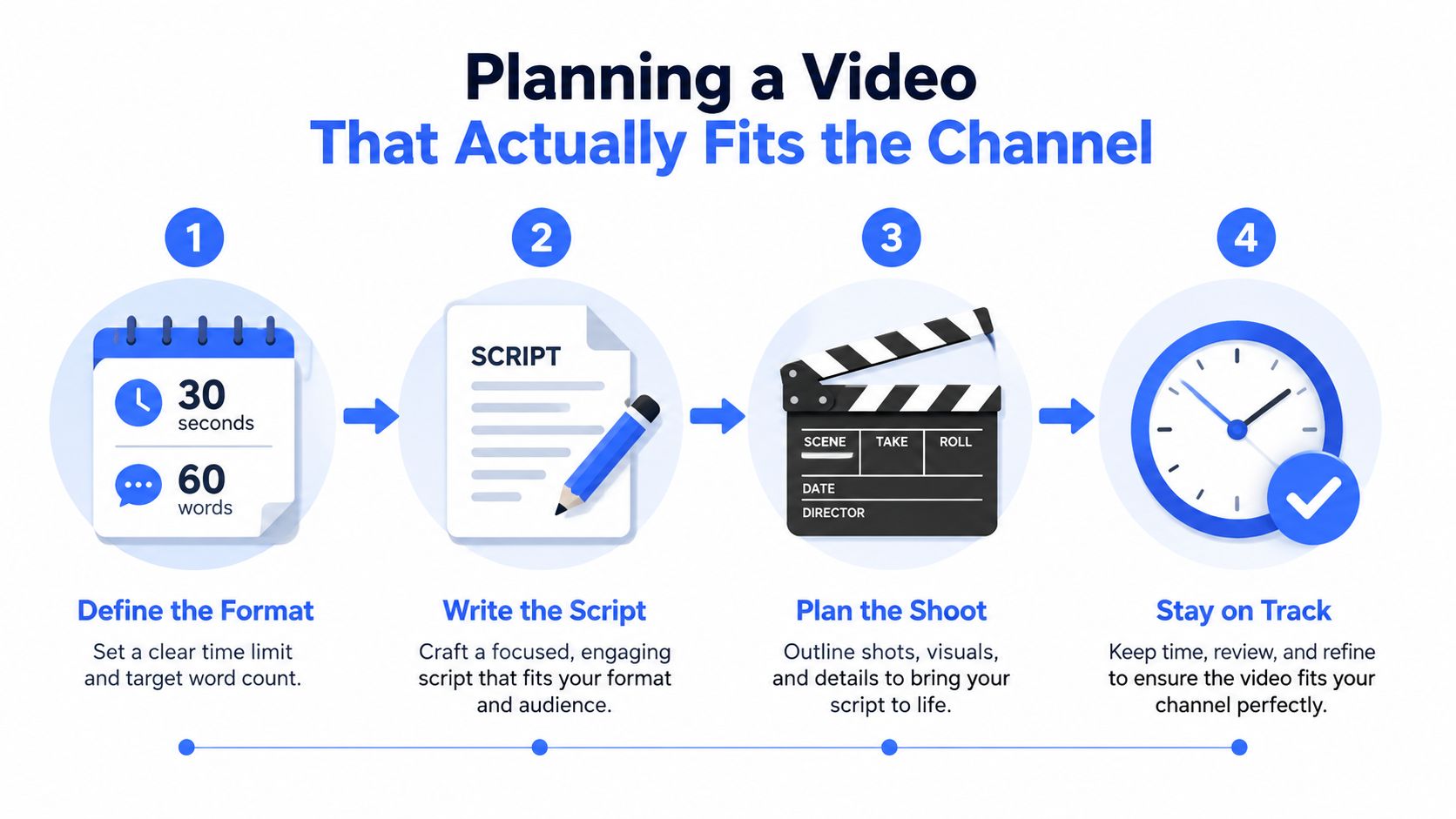
A social ad, YouTube discovery video, and CTV spot can use the same shoot, but they are different distribution products. Choose the destination before choosing the camera, then set the script, framing, pacing, and call to action around that placement.
Use the two-words-per-second rule
Write for roughly two spoken words per second, a practical pacing guideline described in Bono Motion's small-business video production guide. That gives you about 60 words for a 30-second video and 30 words for a 15-second spot, using the same source. Short ads punish clutter. Each sentence should identify a problem, show a useful difference, or direct the viewer.
Build the brief in this order:
Lock the placement. Name the platform, placement, audience, funnel stage, and KPI before writing dialogue.
Write the opening first. Put the problem, promise, or visual surprise in the first three seconds. Skip a logo animation at the start.
Draft to the word count. A 15-second Reels cut needs compressed language. A 60-second YouTube discovery clip can explain more while maintaining momentum. A 6-second bumper needs recognition and one memorable idea. A 15-second CTV spot needs clear brand presence because the viewer is not there to click.
Build useful b-roll. Film the product in use, the process being performed, and the customer problem being solved. Decorative shots can add polish, but they cannot replace proof.
Export for the destination. Match the final aspect ratio to the platform and create native versions instead of relying on a late crop.
Shoot for repurposing without compromising the original
Capture b-roll, record deviations from the call sheet, and preserve clean dialogue and graphics. These habits make cutdowns faster and prevent the only usable shot from showing someone looking away from the product.
The common mistake is shooting horizontally first and promising to crop later. Cropping can cut off the subject, remove product context, and force captions into faces. If social is a primary destination, frame vertical coverage during the shoot. If YouTube or CTV leads the mix, protect the widescreen composition and capture deliberate vertical alternatives.
Production choices should follow the channel mix. Keep straightforward footage in-house when speed and frequent testing matter. Use AI for transcripts, captions, rough cutdowns, and variant ideas, not for moments where a synthetic result could weaken trust. Put more deliberate production behind CTV when the audience needs broad reach and the spot must communicate without a click.
The brief is complete when the channel and KPI appear before the shot list. Otherwise, the crew collects footage. With both decisions fixed, every shot has a job and the finished asset has a defined path to viewers.
DIY, Hybrid, or Agency, How to Choose Without Overthinking It
Production isn't a status symbol. It's a workflow choice. The right model depends on how often you need to publish, how much internal time you can protect, and how expensive a credibility or compliance mistake would be.
DIY keeps the feedback loop short
Use a smartphone, a lavalier microphone, controlled light, and an editing tool such as CapCut or Premiere. DIY is a strong fit for founder tips, product updates, behind-the-scenes clips, and simple customer education. Your team retains speed and learns what viewers respond to before committing to a larger production.
The trade-off is internal labor. Someone still has to write, direct, capture clean audio, edit, caption, approve, publish, and measure. DIY looks inexpensive only when you count the invoice and ignore the hours.
Hybrid puts specialists on the bottleneck
A hybrid team might own strategy and distribution while a freelancer handles the shoot. Another business may film internally and bring in an editor for motion graphics, sound cleanup, and platform-specific cutdowns. This model is usually the practical middle ground for recurring content because it preserves internal knowledge without asking one employee to master every production discipline.
Agency support makes sense when the risk is high
Use an agency for a brand-defining launch, complex animation, multiple stakeholders, regulated messaging, or a campaign that needs production and media management to work together. A full-service partner can manage concept, casting, location, shooting, post-production, and delivery, but the process will require more approvals and a clearer scope.
Factor | DIY | Hybrid | Agency |
|---|---|---|---|
Best fit | Frequent, low-stakes content | Recurring output with specialist support | High-stakes launches and complex campaigns |
Internal demand | High | Moderate | Lower on execution, higher on approvals |
Creative ceiling | Limited by team skill and equipment | Flexible | Highest production range |
Speed | Fast after templates exist | Moderate | Depends on scope and review process |
Control | Direct and immediate | Shared | Structured and formal |
For teams producing large volumes of templated content, enterprise video automation solutions can help standardize versions and reduce repetitive assembly. Automation won't replace positioning, performance direction, or final editorial judgment.
Use a simple decision rule. If the budget is under $2,000 and you need fewer than two videos a quarter, stay DIY. Between $2,000 and $10,000 with recurring output, choose hybrid. Above $10,000 or for a brand-defining launch, an agency can justify its role. Before signing, confirm the deliverables, revision limits, aspect ratios, caption files, ownership of source footage, publishing responsibilities, and KPI reporting. For teams comparing partners, video production agency selection criteria can sharpen that pre-flight review.
Where AI Production Helps and Where It Hurts Your Credibility
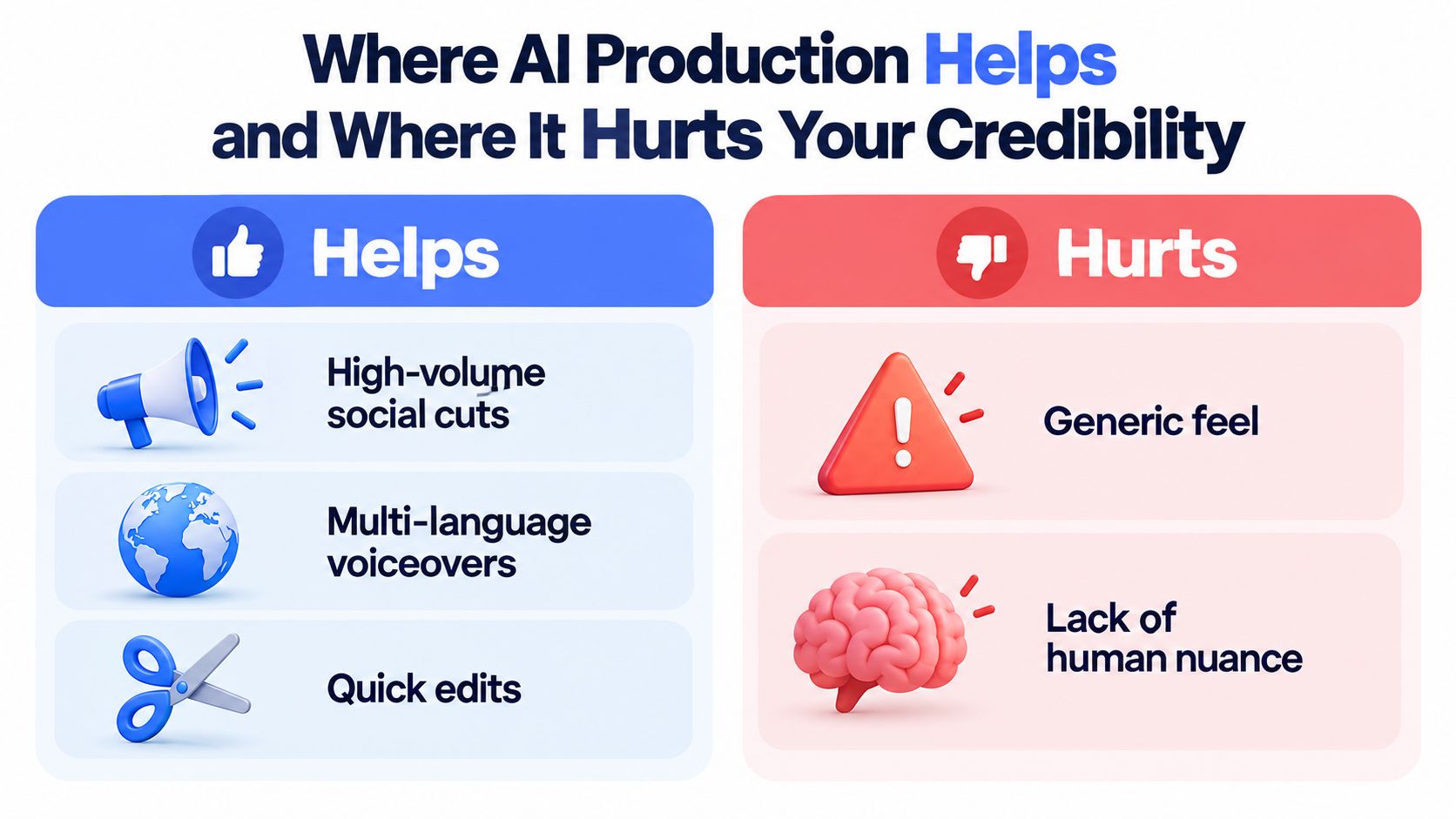
AI is excellent at reducing production friction. It isn't automatically good at representing a business.
Recent reporting says AI-assisted editing, scripting, voiceover, and generation tools helped reduce median production cost from $4,200 to $2,500 per finished minute, while 51% of marketers use AI tools to create or edit video and searches for AI video creators rose 66% on Fiverr over six months, according to Digital Applied's 2026 video marketing data. Those figures show adoption, not a guarantee that synthetic video will persuade your audience.
Give AI the repetitive work
AI tools are useful for high-volume, low-stakes production:
Paid-social cutdowns: Generate alternate openings, captions, crops, and durations from approved footage.
Language versions: Create draft voiceovers and subtitles for multilingual review.
Storyboarding: Turn a concept into a rough visual sequence before booking a live shoot.
Production cleanup: Speed up transcription, silence removal, rough assembly, and caption generation.
A tool such as the ShortGenius AI video ad maker can be useful for testing concepts and assembling early ad variations. Keep the message, claims, and final edit under human control.
Protect the moments that carry trust
AI breaks down when the audience expects lived experience. Founder stories, customer testimonials, medical guidance, financial advice, and premium brand films need credible human presence. A synthetic presenter with unnatural mouth movement, a cloned voice with mechanical cadence, or a generic stock face can make the whole company feel less trustworthy than a slightly imperfect handheld shot.
Use this test: if viewers would feel misled after learning the video was AI-generated, use human-led production. The issue isn't whether the tool is technically impressive. The issue is whether the audience believes the person, evidence, and context.
A sound workflow lets AI handle much of the grunt work while humans own the final editorial decisions. People should approve the facts, voice, emotional tone, claims, brand details, and on-camera performance. Efficiency matters, but credibility is the asset that turns attention into action.
YouTube, Social, and CTV, Picking the Right Home for Each Video
A finished video has no business value until it reaches the right audience in the right environment. YouTube, social platforms, and CTV can all support small business video production, but they reward different creative choices and different definitions of success.
YouTube builds depth and discoverability
YouTube is the broadest platform choice for searchable education, product demonstrations, founder expertise, and pre-roll. YouTube is used by 82% of marketers, according to Wyzowl's video marketing statistics. That scale makes it a practical home for videos that should keep working after the initial paid push.
Use a strong title and thumbnail, but don't confuse packaging with the content itself. The opening should establish the problem quickly, captions should support silent viewing, and the call to action should match the viewer's intent. A demo can point to a trial or consultation. An educational video may first ask for a related guide or email signup. Teams focused on video distribution on YouTube and Google should connect the video topic, page content, metadata, and conversion path rather than treating the upload as an isolated asset.
Social wins discovery and speed
Instagram Reels, TikTok, and LinkedIn are useful when the business needs fast feedback, repeated exposure, and audience discovery. Vertical framing, burned-in captions, immediate hooks, and concise ideas are the operating standard. LinkedIn can support expert-led B2B content, while Reels and TikTok are often better for demonstrations, personality, and product education.
Social decays quickly, so build a library of related cuts instead of betting the entire budget on one post. Guidance on social media for video strategy can help connect production choices to a sustainable publishing workflow.
CTV earns attention, not clicks
CTV is strongest for awareness and recall. Independent benchmarks report roughly 90% to 96% completion on CTV, while cross-network YouTube CTV benchmarks have also been reported around 91% completion, according to Strike Social's YouTube CTV analysis. Treat those figures as completion benchmarks, not proof of sales.
The creative should front-load the brand, make the hook immediate, and use a simple memorable message. CTV adoption among small spenders rose from 60% in 2024 to 85% in 2026, and U.S. digital video ad spend is projected to reach $81.9 billion in 2026, up 11% year over year, according to Mack Media Group's 2026 video marketing summary. Start with a controlled pilot when the audience is broad enough and the objective is recall, not last-click conversion.
Budget media and production together. A cheap video with no distribution plan won't outperform a well-made asset placed in the wrong environment.
Your 90-Day Video Plan and the Metrics That Prove It Worked
Run the first 90 days as three operating sprints. Don't start by promising a permanent publishing machine. Start by creating enough variation to learn which message, format, and channel deserve more investment.
Days 1 through 30, ship and learn
Create two hero videos that can be repurposed into platform-specific cuts. One might explain the offer, while the other answers a high-value customer objection. Lock the audience, funnel stage, placement, CTA, and approval owner before filming.
During the first week, review hook rate and thumb-stop ratio. By the end of the first month, add completion rate and cost per view to the review. Don't optimize based on views alone. Views tell you that distribution occurred, not that the audience understood or valued the message.
Days 31 through 60, distribute and measure
Run paid social tests against three clearly defined audience slices, maintain an organic short-form cadence, and add one CTV pilot if the budget supports an awareness objective. Keep the creative variables controlled enough that you can tell whether the audience, hook, offer, or placement caused the difference.
Use captions, native aspect-ratio exports, UTM tags, and a consistent naming system. A weekly review should answer three questions: which opening held attention, which audience progressed, and which placement created qualified activity?
Days 61 through 90, cut losers and fund winners
By week twelve, track click-through rate, lead-form conversion, and assisted pipeline alongside completion rate and cost per view. Cut the format with the worst cost per qualified lead. Increase spend on the format and message that produce the strongest downstream evidence, not just the largest view count.
Use this checklist before each weekly review:
Brief approval: Confirm audience, placement, offer, CTA, and KPI.
Caption files: Store clean caption files and verify readability on mobile and television.
Aspect-ratio exports: Check every destination-specific version before publishing.
UTM tagging: Tie every clickable placement to a consistent campaign structure.
Review cadence: Record hook, completion, cost, click, lead, and assisted-pipeline results each week.
Decision log: Note what changed and why, so the team doesn't repeat failed tests.
At day 91, compare the program against its own evidence. Did attention hold beyond the opening? Did viewers click or submit forms? Did qualified conversations or assisted pipeline appear? If the answer is yes, scale the winning combination. If not, change the message or channel before commissioning more footage. The point of small business video production isn't to stay busy making assets. It's to build a distribution system that earns the next dollar.

Busylike helps brands plan, produce, and manage branded video across YouTube, CTV, and social, including explainers, product videos, testimonials, and paid ads. Visit Busylike to discuss a production and distribution plan built around your audience, channel mix, and measurable demand goals.


