Advertising on Peacock: How to Buy, Target and Measure

Peacock generated $4.9 billion in revenue in 2024, up 46% from 2023, Comcast reported in its 2025 proxy statement filed with the SEC. A 46% jump at that scale is the number that should reset how a planning team thinks about the platform. Peacock stopped being a streaming experiment and became a place where connected TV budgets land.
The complication is that Peacock doesn't sell one product. It sells live sports, tentpole events, on-demand breaks and programmatic access to the same audience, and each comes with its own buying route, minimum, creative specification and measurement story. Getting a campaign right starts with knowing which of those you're buying.
Table of Contents
What Peacock Advertising Offers in 2026 - Three things a brand actually buys
Buying Routes and Minimums Compared - Five steps from brief to booking
Targeting Options and Audience Controls - Build the audience in three moves
Ad Formats and the Light Ad Load Advantage - Why fewer pods raise the creative burden
CPM Ranges and What a Budget Buys - Two budgets, two impression counts
Creative Specs for a Clean Peacock Launch - The order that prevents a rejected spot
Measuring Incremental Reach, Not Just Impressions - A test design that answers the CMO question
Decide Whether Peacock Fits Your Video Plan - The conditions that make it work
What Peacock Advertising Offers in 2026
Peacock is NBCUniversal's ad-supported streaming service, and the inventory advertisers buy runs on the connected TV screen: live sports, tentpole events, and on-demand series and films. That single sentence hides three different businesses with three different price points and three different proofs of value.
Scale is where any conversation about advertising on peacock has to begin. The same proxy statement reports continued growth in paid subscribers and attributes part of Comcast's domestic advertising revenue growth to Peacock. That attribution is the important part. A streaming service that moves a parent company's advertising line is a different kind of buy from one that merely adds impressions.
Three things a brand actually buys
Live sports and event inventory: NFL games, the Olympics and tentpole broadcasts, sold around real-time viewing rather than around a catalogue.
On-demand ad breaks: standard pods inside series and film, where the audience per minute is smaller but available every night of the week.
Programmatic access to the same audience: demand-side platform buying into Peacock inventory, with its own deal terms, floors and measurement limits.
The 2024 milestone explains why the first category commands a premium. Peacock's audience growth coincided with the Paris Olympics and the service's first exclusive live-streamed NFL playoff game, two events that put large numbers of viewers in front of the platform at a scheduled hour. That scheduled hour is what advertisers pay extra to own, because the audience arrives at the same time instead of spreading across a viewing week.
An on-demand catalogue delivers reach on the viewer's schedule. A live event delivers attention on the broadcaster's schedule. Brands that need a launch moment buy the second and plan the first around it.
The sharper way to place Peacock in a media plan is as a duplication-control layer. Every dollar should answer one question: how much of this audience is reach the plan didn't already have through YouTube, paid social or linear TV. Impressions that duplicate existing reach are the cheapest thing in any buy. Incremental audience is what justifies Peacock's premiums and deal floors.
The planning work follows from that. Match one of the three inventory types to the campaign, price it against the alternatives already in the plan, and define before launch how the added reach will be proven afterward.
Buying Routes and Minimums Compared
Three routes reach Peacock inventory, and they differ on minimum spend, lead time, and how much live-event access you can get.
Peacock buying routes at a glance
Route | Best for | Minimum spend | Notes to confirm |
|---|---|---|---|
Direct sales | Custom campaigns, sports and tentpole packages | High minimums, quoted per deal | Lead times, upfront commitments and inventory availability |
Programmatic via demand-side platforms | Scaled, automated buying across available inventory | Set by the platform and deal, usually a floor per deal | Olympic and Paralympic inventory first offered programmatically in 2024 |
Peacock Ad Manager | Self-serve campaigns | Not publicly verified, confirm with the seller | Built with tvScientific; confirm eligibility, targeting and measurement |
Direct sales remain the route for custom campaigns and sports or tentpole packages. Those deals are increasingly sold inside broader NBCUniversal portfolios rather than as standalone streaming buys, and the numbers show why: Peacock's 2025 upfront volume rose more than 20% year over year and represented nearly one-third of the company's total upfront commitments, TV Technology reported. Expect long lead times, inventory held for anchor advertisers, and a minimum quoted per deal rather than published on a page.
Programmatic buying through demand-side platforms is the scaled route, and its biggest change came in 2024, when NBCUniversal made the Olympic and Paralympic Games available to advertisers programmatically for the first time. Adding Peacock's streaming inventory to that package reportedly doubled NBCUniversal's available advertising inventory, according to Solomon Partners' Future of Sports Advertising report. Live sports access used to require direct publisher deals with high minimum spends, long lead times and production requirements, so programmatic access rewired the buying mechanics for the inventory advertisers want most.
Peacock Ad Manager is the self-serve product NBCUniversal developed with CTV ad-tech company tvScientific, as Noble Digital's buying guide sets out, and it suits campaigns that don't need bespoke packages. NBCUniversal has not publicly verified a universal minimum spend for it, so confirm account eligibility, minimums, targeting, inventory and measurement scope directly before you build a plan around the dashboard. Self-serve access is not the same as guaranteed access to a conference championship.
If Disney's inventory is also in the mix, our breakdown of advertising on Hulu shows how its routes and package structure compare.
Five steps from brief to booking
Set the goal against the event calendar. Decide whether the campaign needs live moments or always-on reach, then map it to the sports and tentpole dates that fit the product's season.
Choose the route from budget and inventory need. A self-serve test doesn't justify a direct deal, and a playoff package doesn't run through a dashboard.
Get minimums confirmed in writing. Include the currency, the fee treatment, and what happens to underspend.
Name the measurement partner before signing. Agree the metrics, the reporting cadence and who owns the deduplication analysis.
Book with lead time for creative approval. Transcription, ad-serving QA and platform sign-off rarely run on a 48-hour schedule.
Three questions settle the route faster than any rate card:
Decide in this order. How much budget can be committed, how much live inventory the campaign truly needs, and how much measurement detail the buyer will accept. Answer those honestly and the route picks itself.
Targeting Options and Audience Controls
Targeting on Peacock follows the buying route, not a single platform-wide menu. The first task is to confirm what your specific route exposes before anyone builds a segment list. Direct deals can package audiences around sports and tentpole properties. Programmatic buying inherits whatever audience and signal options your demand-side platform supports. Peacock Ad Manager targeting has to be confirmed for your own account rather than assumed from a demo.
Build the audience in three moves
Define the segments the campaign must reach. Start from a viewer or household profile tied to the product, not from a generic interest bucket that every streaming platform sells.
Check which targeting and exclusion options each route supports. Some routes give you content-level adjacency and daypart control; others trade that for scale.
Cap frequency where available and split the line items. Run live-event and on-demand as separate lines so each audience is planned and measured on its own terms.
A narrow segment behaves badly on a short ad load. Put a few hundred thousand households into a rotation that runs four minutes an hour and the same people meet the same spot in the same evening. The impressions look healthy and the persuasion doesn't.
Where the route allows it, exclude households you're already serving on competing video buys. That keeps a duplication test clean, because an incremental reach number built on an overlapping base proves nothing.
Practical rule: write every targeting option and its cost into the media authorization. Targeting premiums move the effective CPM, and a scope that doesn't name them becomes a surprise at reconciliation.
Record the exclusion logic in the same document, including which audiences were suppressed and why. Six weeks later, that note is the difference between a measured result and an argument.
Ad Formats and the Light Ad Load Advantage
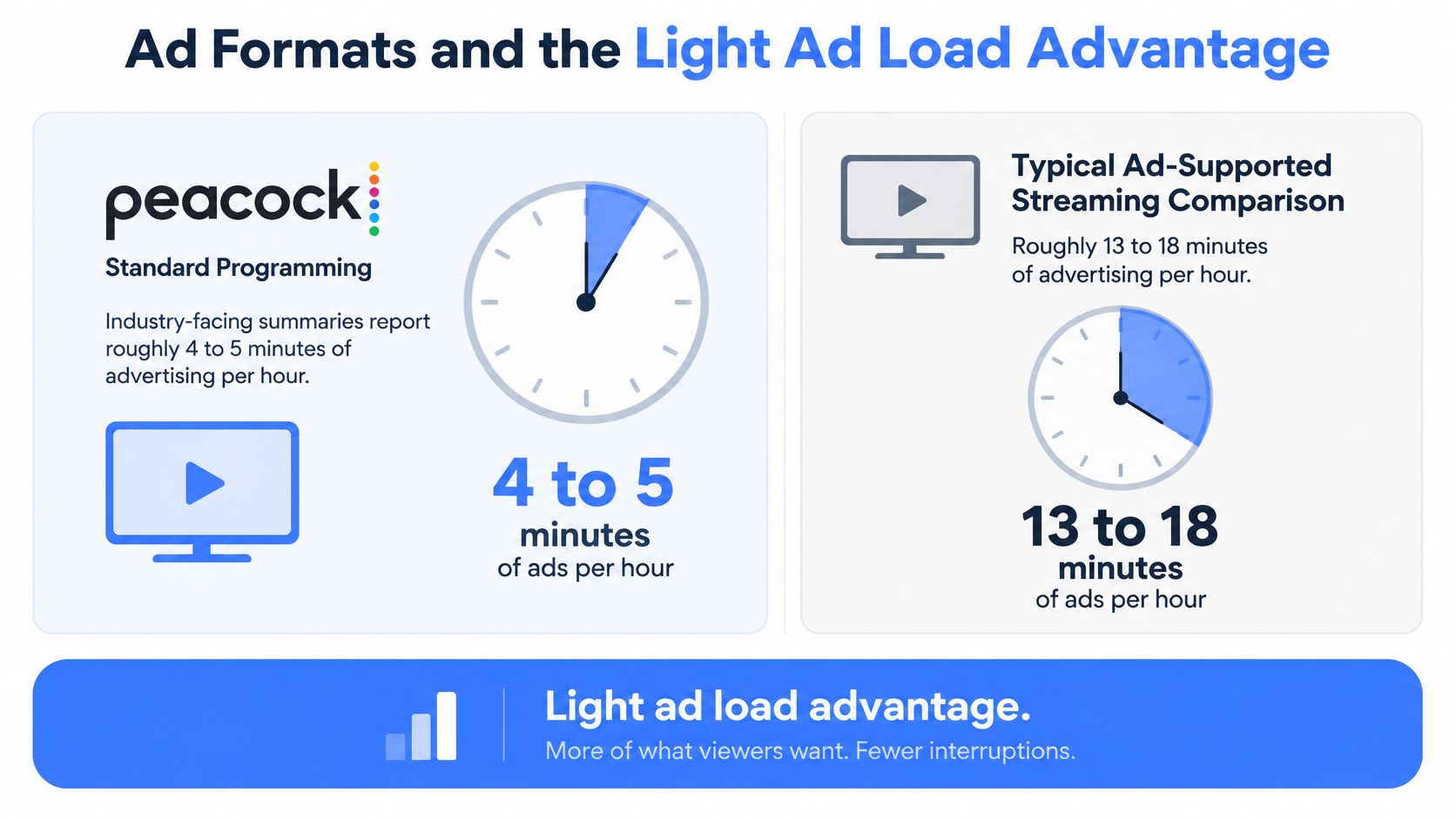
Peacock runs roughly 4 to 5 minutes of advertising per hour on standard programming, against roughly 13 to 18 minutes on traditional linear television, according to Tatari's guide to Peacock advertising. That contrast is the commercial argument in a single line, so it's worth seeing side by side.
NBCUniversal has spent the past several years building formats around the streaming interface rather than reproducing a television break. The list includes Pause Ads, Spotlight Ads, virtual concessions and Arrival Ads served when a viewer enters the platform. NBCUniversal reported that Arrival Ads produced a 68% lift in ad memorability and a 106% lift in foot traffic for advertisers, Marketing Dive reported. Those are company-reported performance claims, not independent benchmarks, and they should be read as directional evidence that placement context affects recall.
Why fewer pods raise the creative burden
A light ad load concentrates exposure. The same viewer sees your brand more often per hour than they would in a heavy linear break, so a campaign with one spot on rotation starts to wear out inside a week. Completion rate often stays high while persuasion falls, because finishing a familiar ad isn't the same as being moved by it. NBCUniversal's formats reward creative built for the moment, and the moment is short.
That sets a practical answer on volume. A 30-second hero plus a 15-second cutdown, rotated across two live-event line items and two on-demand line items, gives you four cells to read and enough variety to survive a two-week flight. Review frequency weekly and swap the weakest cell rather than adding budget to a tired one.
Format choice should follow the viewing moment. A Pause Ad suits a lean-in viewer who has already stopped the playback. An Arrival Ad suits the first second of a session, before habit sets in. A standard 30-second spot inside a drama carries the brand story. Buying all four the same way wastes the difference between them.
CPM Ranges and What a Budget Buys
CPM is the cost per thousand impressions, and Peacock should be priced as premium CTV rather than as broad-reach online video. The bands below come from industry reporting and market estimates; NBCUniversal does not publish a public rate card for them.
Peacock CPM ranges by inventory type
Inventory | Estimated CPM | Basis | Planning note |
|---|---|---|---|
Peacock programmatic premium AVOD | $25–$45 | Planning estimate | Standard premium AVOD range, including Peacock |
Peacock reported range | $20s–$30s | Industry reporting | Peacock-specific benchmark |
Standard premium CTV | $25–$65 | Market estimate | Varies by audience and placement |
Live sports and major events | $40–$80 and above | Market estimate | Highest demand, concentrated inventory |
Direct or premium placements | Above $80 | Negotiated per deal, quoted per placement | Treat as a ceiling case and confirm scope with the seller |
Digiday's reporting on advertiser success metrics places Peacock CPMs in the $20s to $30s and broader programmatic premium AVOD planning, including Peacock, around $25 to $45. Direct and premium placements sit above the live-event band and are quoted per placement, so they belong in the plan as a ceiling case rather than a working CPM.
Two budgets, two impression counts
At a $30 CPM, a $100,000 media budget buys approximately 3.33 million gross impressions before fees, make-goods or targeting premiums. That is the gross count before deduplication, and the gap between gross delivery and new households is where most budget reviews go wrong.
Live sports sits in a different band. The market estimates summarized by TSE Entertainment's streaming advertising white paper put standard premium CTV around $25 to $65 CPM and live sports above $40 to $80 CPM; at a $35 CPM, a $10,000 campaign produces roughly 285,000 gross impressions before fees. Actual pricing depends on the event, the audience, the placement, the buying route and what inventory is left.
Premium CTV pricing also moves by platform, and our guide to advertising on Roku sets its bands beside Peacock's when you are splitting a fixed budget across two CTV environments.
The useful question is not how many impressions a CPM buys. It is how many households Peacock adds after overlap with YouTube, linear and paid social is removed. A clean test keeps one Peacock line item inside a fixed band, holds frequency steady, then compares exposed households against a matched holdout before renewal; a cheap impression that reaches the same household for the fifth time is an expensive one.
Creative Specs for a Clean Peacock Launch
Peacock's technical gate is stricter than most buyers expect, so treat the specification list as a pre-flight check rather than a reference page.
Peacock creative and delivery requirements
Requirement | Value | Why it matters |
|---|---|---|
Resolution | 1920×1080, 16:9 | Required master format |
Mezzanine file | Apple ProRes 422 HQ or H.264 | Source for transcoding into renditions |
High-quality rendition bitrate | 3.25–5 Mbps | Typical encoding for delivered versions |
Google Campaign Manager mezzanine | Minimum 1920×1080 at 15 Mbps | Needed for trafficking through GCM |
Audio | 48 kHz, two-channel | Prevents missing stereo channels |
Loudness | CALM −24 LKFS ±2 | Keeps perceived volume consistent |
Ad tags | VAST 2.0 | VAST/VPAID hybrid tags are not compatible |
The master is a 1920×1080 file in Apple ProRes 422 HQ or H.264, with high-quality renditions typically encoded at 3.25 to 5 Mbps, according to NBCUniversal's programmatic video guidelines. Audio must run at 48 kHz, two-channel, and comply with CALM loudness at −24 LKFS ±2. A missing stereo channel or a hot mix produces inconsistent perceived volume, and inconsistent volume gets a spot rejected rather than corrected.
Trafficking through Google Campaign Manager adds its own floor. Peacock requires a minimum 1920×1080 mezzanine at 15 Mbps and VAST 2.0 tags, and VAST/VPAID hybrid tags are not compatible.
The order that prevents a rejected spot
Build a Peacock-specific 16:9 master. Don't rewrap the YouTube export; encode from the graded master at the required bitrate.
Run the audio check against both requirements. Confirm two channels are present and measure loudness to the CALM target before the file leaves the edit.
Validate the VAST 2.0 tags before media launch. Test the tag in the ad server, not in a spreadsheet.
The failure case is predictable and expensive. A creative that clears YouTube or ordinary CTV specifications can still fail inside Peacock's supply path, and the fix lands in the last week before launch when no one has room for another encode. Build the Peacock package first and adapt backward.
When a Peacock quote sits next to a YouTube quote in the same plan, it helps to know where the other platform's costs land, and YouTube ad costs in 2026 breaks that down by format.
Sign-off list. The editor owns the master resolution, bitrate and aspect ratio. The audio engineer owns channel count and loudness. Ad ops owns the VAST 2.0 validation. One of the three signs the package, and that name goes on the trafficking sheet.
Measuring Incremental Reach, Not Just Impressions
Impressions are the easiest metric to report and the least useful one to defend. Peacock may be most valuable to a mature video plan as a duplication-control and incremental-audience layer, not as another broad-reach line alongside YouTube, Hulu, Roku and linear NBC.
The case rests on how concentrated the audience is in ad-supported viewing. Industry reporting estimates that roughly 84% of Peacock's paid subscribers use an ad-supported tier, and NBCUniversal's own advertising materials claim that 64% of Peacock viewers are not reached on competing ad-supported tiers, based on Nielsen duplication analysis and third-party ad-tier estimates, Axis Intelligence's Peacock audience statistics summarize. The 64% figure is a platform claim, not a campaign fact, and it can only be settled for your buy with your own data.
A test design that answers the CMO question
Set a baseline on the video you already buy. Run YouTube or another CTV line against the same audience profile for a comparable period, so the comparison has a floor.
Use matched reach-frequency reporting or a clean-room workflow. Where the route supports it, match exposures at household level rather than comparing platform totals.
Separate incremental reach from extra impressions. Report the households Peacock added, not the impressions it served.
Compare cost per incremental completed view or qualified visit. A higher CPM with genuine new reach can beat a cheap CPM that repeats the same living rooms.
Completion rate misleads when frequency runs high. A viewer who finishes the spot five times adds one household and four repeats, and the completion metric records all five as success. Pair it with deduplicated reach before anyone celebrates.
What goes to the CMO. Incremental reach, frequency, and the one outcome metric agreed before launch. If the outcome metric wasn't agreed in advance, the campaign has a reporting problem no post-hoc analysis can fix.
If the campaign's job extends past awareness into qualified visits, the guide to converting SaaS traffic covers what should happen after the click, which is the half of the funnel most CTV reports ignore. And when the buy runs through demand-side platforms, our programmatic video ads breakdown covers how deal floors and transparency shape the same measurement question.
Decide Whether Peacock Fits Your Video Plan
Peacock fits a plan that needs live sports or premium event moments, can absorb premium CPMs, and will measure incremental reach instead of impressions alone. It fits poorly when the budget can't clear the quoted minimums, when one creative cut has to carry a whole flight, or when nobody on the team can measure duplication against the video already running.
The conditions that make it work
A compliant master from the start. 16:9 at 1920×1080, a clean two-channel mix at the CALM target, and validated VAST 2.0 tags.
A budget that clears the route. Self-serve or programmatic floors for a test, direct-deal minimums for sports.
A measurement partner agreed before launch. Deduplicated reach and one pre-agreed outcome metric, with an owner for the analysis.
Busylike manages advertising and channels on YouTube, connected TV and streaming apps, so we can plan and place Peacock campaigns alongside the rest of your video plan, and build the platform-native edits and incremental-reach test described here rather than adapting a single spot after the media is booked.
The action for this week is narrow. Request the minimum, the available inventory, the targeting scope and the measurement terms in writing from NBCUniversal or a qualified buyer, then build the pre-flight checklist from the specifications above before any creative is finalised. Both take an afternoon, and both decide whether the campaign reads as a premium buy or an expensive test.
Peacock rewards advertisers who plan it as a deliberate layer in a video strategy, not an add-on at the end of a media plan. Busylike plans, produces and manages video across YouTube, connected TV and streaming apps, so we can handle the buying route, build the 16:9 master and platform-native cutdowns to Peacock's specifications, and run the incremental-reach test that tells you what the platform added. Visit Busylike when you're ready to build the Peacock plan and the proof around it.