
YouTube BrandConnect: How Brands Find and Pay Creators

The creator video did its job. Views came in, comments piled up, the subscriber count moved. Then the invoice lands, someone in finance asks what the spend bought, and the only number anyone can produce is a view count.
That gap is rarely a creative problem. It shows up at the seams of the deal: whether the creator was reachable in the first place, what the fee really was once negotiation finished, what the brand is licensed to do with the footage afterward, and whether anyone set a baseline before the first frame ran.
YouTube BrandConnect exists to close some of those seams. The parts it doesn't close are where most of the planning work sits, and they're the parts a brand-side planner has to own.
Table of Contents
What YouTube BrandConnect Is and Why It Is Managed - From sponsorship directory to measurement layer
How a Partnership Moves From Offer to Agreement - Seven steps from first offer to signed scope
Set Up Lift Measurement Before the First Video Goes Live - What conversion tracking actually requires
Turning Creator Videos Into Paid Ads - Publish organic, amplify what responds - Check format support before the creative plan locks
Audience Data Checks and Partnership Diligence - Four checks to run on every shortlisted creator
What YouTube BrandConnect Is and Why It Is Managed
Say you're the brand manager who needs one outcome from a creator deal: more branded search after the video runs, not a larger view count to take upstairs. That changes who you approach, how you brief them, and what you're willing to pay for.
YouTube BrandConnect is YouTube's branded-content marketplace connecting creators and advertisers. YouTube introduced it on June 16, 2020, evolving FameBit, the influencer-marketing platform Google had acquired in 2016, into a marketplace built around insight-based matchmaking, campaign-management support and measurement, as YouTube's launch announcement sets out. The commercial logic was already established: Google reported that average deal size across its full-service branded-content product had grown by more than 260% over the preceding two years.
From sponsorship directory to measurement layer
The launch introduced or expanded metrics a planner can argue with. Brand Interest Lift measured changes in consumer search behavior after exposure to a creator's video. Influencer Lift assessed outcomes such as purchase intent and brand recall. Organic view-through conversations quantified audience response beyond paid media numbers. The starting threshold was tight: U.S. creators with at least 25,000 subscribers could sign up through YouTube Studio.
The structure you meet today came out of the 2020 restructuring, not the launch itself. YouTube discontinued the FameBit self-service website and closed existing self-service accounts on July 31, 2020. TechCrunch's reporting noted that self-service represented only 4% of total FameBit payouts to creators, while creators could earn roughly 30 times more from full-service deals.
A marketplace where nearly all the money already flows through managed deals doesn't need a self-service checkout. It needs specialists who can match, brief and measure.
That ratio explains the shape of the product. Managed campaigns, in which specialists match eligible creators with brands, became the center, and brands gained a route to connect creator activity with the analytics they already trust. YouTube has been consolidating the same capability under the name Creator Partnerships, which is the label you'll meet inside Google Ads and Display & Video 360. The core idea survives the rename: creator selection, branded execution and performance measurement sit in one place, so a deal gets judged on outcomes rather than view counts.
Who Can Join From the Creator and Brand Side
Eligibility decides a campaign before creative does, and it runs on two different rulebooks depending on which side of the deal you sit. Use this as the lookup, then read the caveats underneath.
Party | Requirement | Detail |
|---|---|---|
Creator | YouTube Partner Program membership | Required, in a supported country or region |
Creator | Launch threshold for U.S. creators | 25,000 subscribers at the 2020 launch, historical reference only |
Creator | Initial availability of Creator Partnerships | United States, India, Indonesia, United Kingdom, Brazil, Australia, Canada |
Brand | Account team | Assigned Large Customer Sales or Google Customer Solutions team |
Brand | Spend threshold | More than $1,000 USD on Demand Gen or YouTube in the previous year |
On the creator side, YouTube Partner Program membership is the base requirement, and access is limited to creators in supported countries or regions, as YouTube's Creator Partnerships documentation states. The unified experience opened in seven markets: the United States, India, Indonesia, the United Kingdom, Brazil, Australia and Canada, with expansion planned beyond that list.
On the brand side, the gate is narrower than many expect. Google's Creator partnerships overview ties eligibility to two conditions: the Google Ads account needs an assigned Large Customer Sales or Google Customer Solutions team, and it must have spent more than $1,000 USD on Demand Gen or YouTube during the previous year. Eligible advertisers can preview suggested sponsored creator videos and send linking requests from the account.
Planning consequence: a brand without an account team or that spend history cannot preview suggested creator videos, so BrandConnect isn't self-service in the way TikTok One or Meta Business Suite reads. Budget the setup time, or route the work through an agency that already has it.
Eligibility on paper doesn't guarantee every function. Features like Open Call have had narrower availability than the headline market list, so confirm the specific workflow you need exists in the specific market before you promise anyone a date.
For multinational brands, the harder question isn't eligibility at all. It's whether to build one global brief around the platform or to run a hybrid model that combines platform tools with agency sourcing, local contracts and direct outreach. In markets outside the supported list, platform consolidation improves scale for headquarters and reduces visibility into qualified local creators at the same time. Rights, exclusivity, paid-media usage, local advertising disclosures, taxation, language and suitability stay manual checks in every market. Retail teams weighing where creator content fits next to product pages and paid placements can start with our notes on YouTube for retail.
Check Readiness Before You Contact a Creator
Run these five checks before a single outreach message goes out. Each one can stop a campaign, and none gets cheaper to fix once the brief is approved.
Confirm account access. Verify the Google Ads account clears the platform's current access conditions and keep a dated note of what you saw. A planner who assumes access and finds an empty suggestion panel two days before launch has no recovery path.
Confirm the creator's market and Partner Program status. Reachability is a geographic question as much as a quality one. A creator outside a supported market can be excellent and still unreachable through the platform workflow, which means a direct contract, a local production contact or a different creator.
Name the objective and the primary metric. Decide whether the deal buys awareness, demand creation or tracked conversions before you shortlist anyone. The metric determines which lift setup you need, and the setup determines whether the campaign can be evaluated at all.
Record the pre-campaign baseline. Capture search, survey or conversion figures before anything publishes. Without a stored baseline, whoever presents results afterward gets to pick the comparison that flatters the campaign.
Agree linking and paid-usage rights in writing. A creator must accept the linking request before the video can run as a partnership ad. Put permission, territory, duration and paid-media scope in the contract, not in a direct message.
Treat the amount you enter as an offer as a budget placeholder rather than a fee, because the final number is negotiated between brand and creator and can land higher.
The checklist is finished only when every item has a named owner and a recorded answer. We're a YouTube certified video production and marketing agency and this is the stage where most rework originates; when the internal conversation needs a second opinion, a free consultation call is the fastest way to pressure-test the plan.
How a Partnership Moves From Offer to Agreement
Negotiation inside the platform is deliberately thin. It opens the door, hands over a contact, and gets out of the way.
Here's the shape most planners meet in the interface before they send anything.
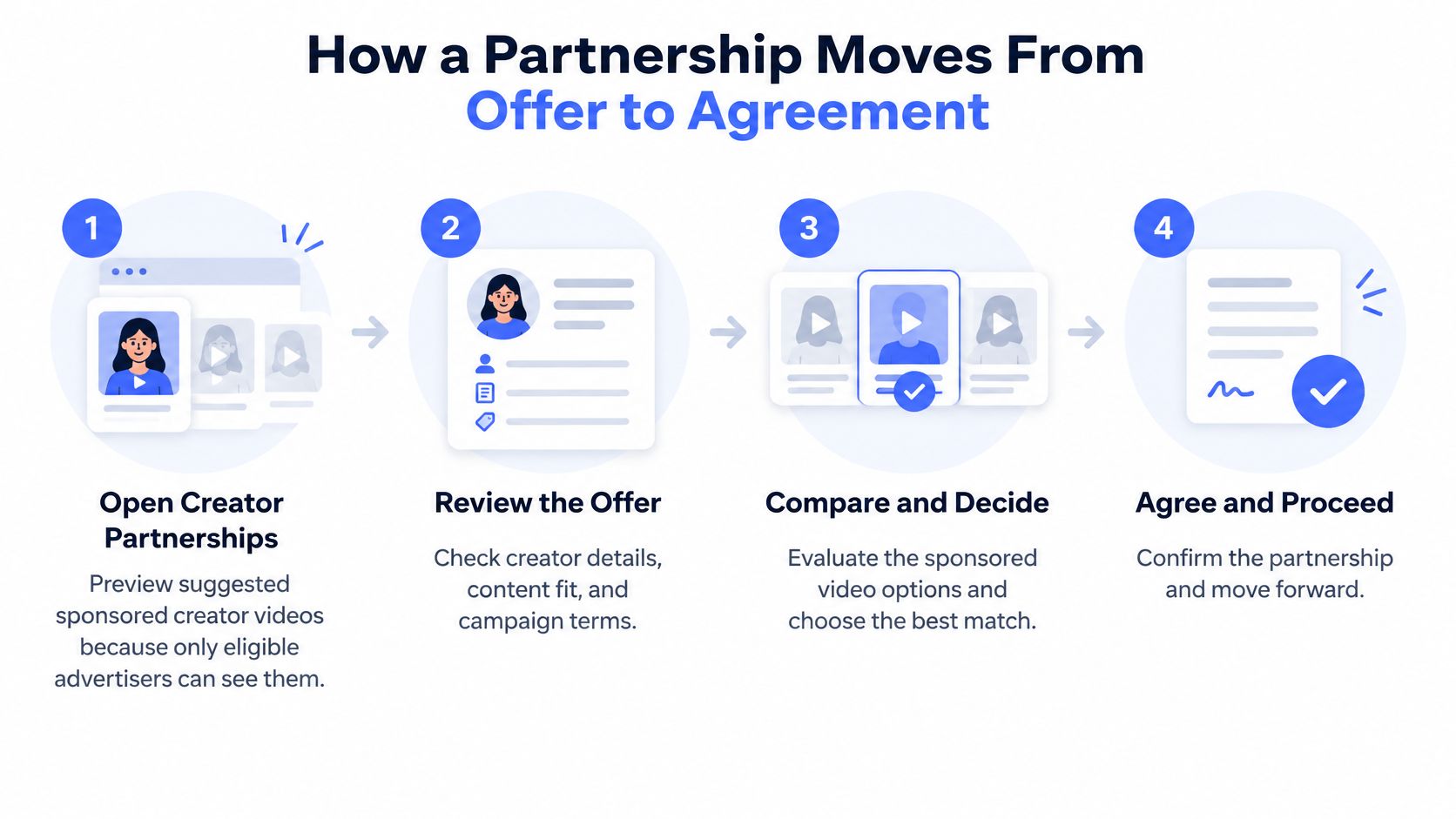
Seven steps from first offer to signed scope
Open Creator Partnerships and preview suggestions. Only eligible advertisers see the suggested sponsored creator videos, so a blank panel signals an access problem rather than a market with no creators. The slip is treating the suggestions as the whole universe and never using search.
Send linking requests or offers. An advertiser can send up to 30 offers to creators at one time, according to Google's BrandConnect offer documentation. Thirty is enough to test a qualified shortlist and nowhere near enough to blanket a category, so do the filtering first.
Enter an amount in the offer field. That number starts a conversation. It isn't the creator's fee, and teams that approve budget at the offer stage routinely discover the gap when terms come back.
Wait for interest, then move to email. If a creator is interested, the advertiser receives the creator's email address and the proposal proceeds offline. Nothing about deliverables, exclusivity or timing gets settled inside the interface.
Negotiate the scope directly. Deliverables, publish date, exclusivity window, revision rounds and fee are agreed between brand and creator. Bring standard terms and expect the creator's manager to have their own.
Use the video once the link is accepted. After acceptance, the brand can use the video in partnership ads and read its organic performance metrics. Starting paid amplification before acceptance, or before paid-usage rights exist, is the slip that ends in a takedown request and a wasted media flight.
Confirm everything in writing before spend begins. A signed scope covering fee, payment terms, usage window and approval rights is the only artifact that survives a change of personnel on either side.
Common slip: the offer amount gets treated as the price, and the signed scope becomes an afterthought. Both errors surface at the same moment, when someone asks why the invoice doesn't match the plan.
A completed deal looks unremarkable on paper, which is the point: a signed scope, a linked video sitting in the account, an approved cut, and a start date both sides recognize.
Here's a short walkthrough of the linking and offer flow as it appears to an advertiser.
Payment itself runs outside the platform, on the terms recorded in that scope. The fee, the schedule and the invoicing route are commercial agreements between two parties, and the marketplace's job ends at introductions and creative linkage.
Set Up Lift Measurement Before the First Video Goes Live
Lift studies are a before-and-after instrument. Configure them after the first video goes live and you've thrown away the "before".
BrandConnect supports an end-to-end measurement workflow rather than treating creator content as an unmeasured sponsorship. Advertisers can configure lift measurement before the first campaign video goes live, then read Search Lift and Survey Lift results in the campaign dashboard. Search Lift captures changes in relevant consumer search behavior. Survey Lift measures changes reported through brand surveys. Conversion data is different: it only exists once conversion tracking has been configured properly.
Each objective maps to a different instrument, and each instrument has its own pre-launch task:
Objective | Metric | Setup before launch |
|---|---|---|
Brand awareness | Survey Lift | Brand survey configured in the campaign dashboard before the first video goes live |
Demand creation | Search Lift | Pre-campaign search baseline captured for relevant consumer queries |
Performance | Conversion tracking | Conversion actions defined, tags or integrations installed, attribution validated |
All objectives | Pre-campaign baseline | Baseline recorded so results can be compared after launch |
Every row shares one property: the work happens before spend, not after.
What conversion tracking actually requires
Three tasks, in order. Define the conversion actions that represent real business outcomes rather than soft signals. Install the measurement tags or integrations those actions depend on. Then validate attribution, ideally with a short test before the campaign publishes, so you're not debugging a tag while a creator's audience is already watching. A tag that fires on the wrong page or an action that double-counts will contaminate the whole flight, and by the time the discrepancy shows up in reporting, the spend is gone.
Pick one primary metric per objective and write it into the brief. When two metrics both "count", the losing one quietly disappears from the results deck.
The same discipline applies to organic numbers. Our walkthrough of YouTube video analytics covers which creator-side metrics are worth reading before paid spend starts. And if the broader question is how a single lift study sits inside a full effectiveness program rather than one campaign, this guide to measuring campaign impact lays out the surrounding framework well enough to borrow from.
Here's the short test. If the team can't name the baseline and the primary metric before the first video goes live, the setup is not ready and the launch date should move.
Turning Creator Videos Into Paid Ads
The cheapest paid media a brand will ever run is a creator video that already worked organically. The linking flow exists so you can find that video and put budget behind it.
Publish organic, amplify what responds
The sequence matters more than the tooling. A creator publishes native content. The brand watches which videos and audience cohorts respond early. Then the strongest assets get amplified through Google Ads instead of commissioning separate ad creative from scratch. When a creator accepts the linking request, the advertiser can access the video's organic performance metrics in Google Ads and use the linked video in advertising, as YouTube's help page on video linking explains. The resulting audience data can also build segments from organic viewers of sponsored content, which is usually the most valuable targeting a creator deal produces.
Platform tests have found that partnership ads running on the creator's channel can outperform ads carrying advertiser branding alone. Treat results like that as directional when you argue for the test. The only number that belongs in the forecast is the one your own control comparison produces.
Check format support before the creative plan locks
Campaign-type support is uneven, and the co-branded format is the narrower of the two options.
Campaign type | Creator partnerships | Co-branded partnership ad |
|---|---|---|
Video action | Supported | No, not listed for this campaign type |
Demand Gen | Supported | Yes, in-feed and Shorts |
Video reach | Supported | Yes, specified placements including Shorts and living-room |
Video view | Supported | Yes, specified placements including Shorts and living-room |
App | Supported | Yes, iOS-only campaigns |
Performance Max | Supported | No |
Google Ads help on partnership ads lists creator partnership support across Video action, Demand Gen, Video reach, Video view, App and Performance Max campaigns. The co-branded format is supported in Demand Gen for in-feed and Shorts, in Video reach and Video view for specified placements including Shorts and living-room inventory, and in iOS-only App campaigns. Performance Max doesn't support it at all. If the media plan leans on co-branded creative inside Performance Max, the plan is wrong, and it's cheaper to learn that now than after the shoot.
Teams running this across many accounts often want the account-level checks automated, and AI agent access to ad accounts is the current route for that. Whether amplification runs in-house or through a partner such as Busylike, which handles YouTube ads management alongside channel management and paid video advertising, the sequence worth following is the same: negotiate linking and paid-usage rights explicitly, define an organic-to-paid testing window, then compare creator-native assets against conventional branded controls on conversion rate and cost per conversion. A test without a control produces a case study. A test with one produces evidence.
Audience Data Checks and Partnership Diligence
YouTube now lets creators opt in to share channel and audience data with brands, advertisers and third-party platforms to improve discoverability for brand deals, higher-revenue advertising and shopping opportunities, as Tubefilter reported. Two design details carry the strategy: the setting is off by default, and consent can be withdrawn later. Discoverability and data sharing are separate decisions, made by different parties, at different times.
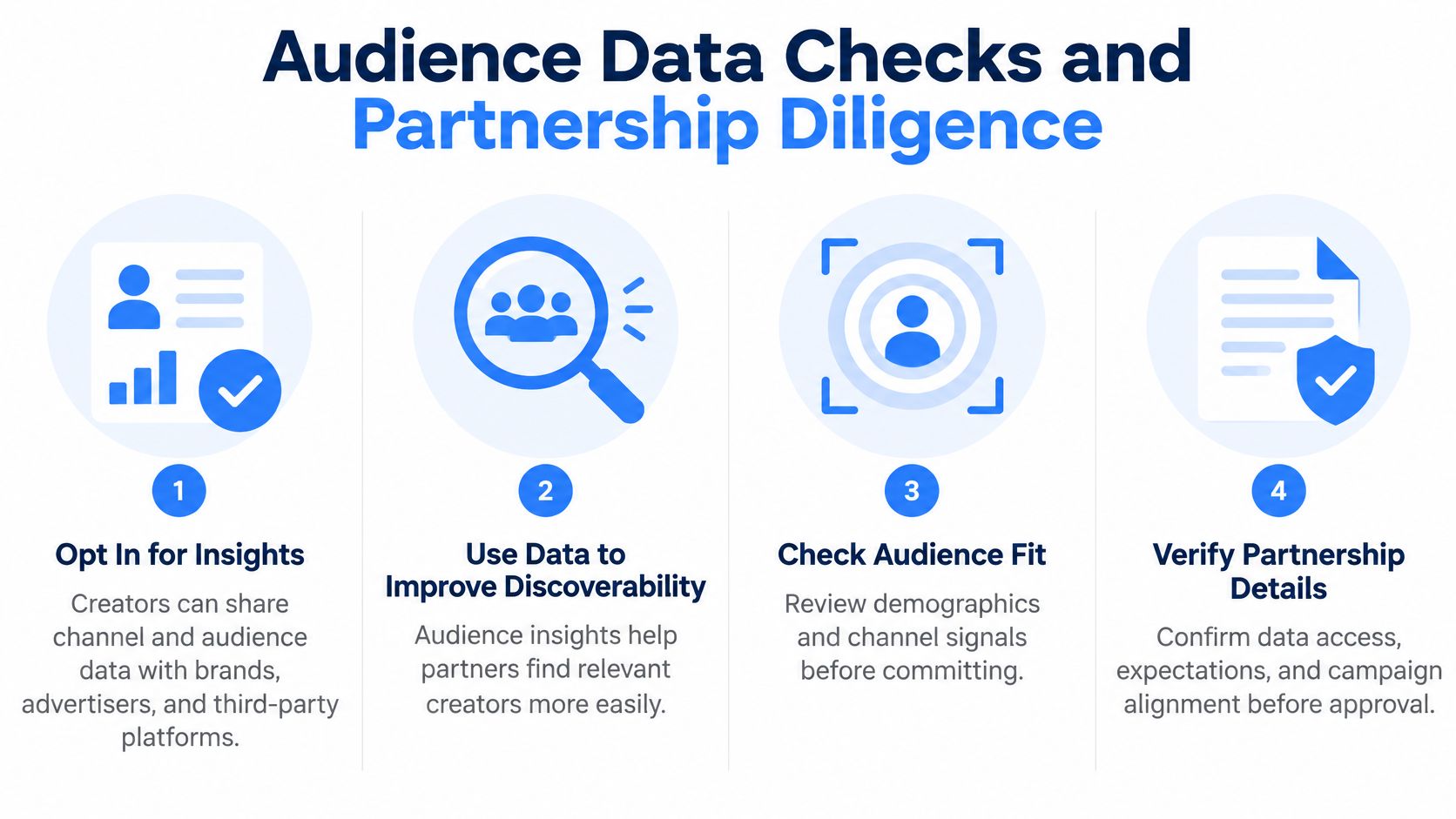
More visible data improves matching. It does not automatically improve results. A team that over-indexes on demographic fit can miss the things that move a campaign: creative credibility, audience attention, disclosure quality and incremental lift. Diligence on the shared data should happen before outreach converts to an offer.
Four checks to run on every shortlisted creator
Separate first-party analytics from modeled insight. Channel data a creator exports is evidence. Platform-modeled audience characteristics are an estimate. Label which is which before either reaches a media plan.
Ask for audience geography and age composition in writing. A document the creator stands behind carries more weight than a dashboard screenshot, and it becomes the reference point if delivery later looks wrong.
Compare disclosed data against actual campaign delivery. Once the paid test runs, check whether the audience the brand paid to reach matches the audience that was described. A persistent gap between the two is grounds to renegotiate or walk.
Define retention and access rules in the contract. Who holds the audience data, how long they keep it, who can query it, and what happens when the partnership ends.
Diligence rule: disclosed audience data is a screening layer. It narrows a shortlist. Creative fit and measured lift decide the deal.
Healthcare, technology and enterprise briefs deserve stricter review before selection, because demographic, behavioral and inferred-interest data can raise privacy, compliance and brand-safety questions that a general consumer campaign never touches. In those categories, route the disclosed data and the intended targeting through legal review before the shortlist is final.
Shared audience data also degrades when traffic quality is poor, so build validation windows for creator payouts into the deal terms and check delivery before releasing the second tranche. When a partnership renews, pull fresh exports rather than reusing the original ones; audience composition drifts between flights, and last year's demographics are a weak basis for this year's spend.
Busylike manages influencer and creator partnerships and paid media across YouTube. If you're weighing whether a BrandConnect campaign or a hybrid mix of platform tools and direct creator deals fits your next launch, Busylike can map the measurement setup before any outreach goes out.

