
How to Run a YouTube Thumbnail Test That Finds Winners

For marketing teams managing brand channels, that changes how you run a YouTube thumbnail test. Click-through rate still matters, but it is only the first half of the decision. A thumbnail that pulls the wrong viewer creates a short visit, weaker retention, and a result that looks good in the report but performs poorly for the channel.

Run the test with realistic impression math. Small channels often do not have enough traffic for early differences to mean anything, so a lead after a handful of views is noise, not a winner. Pair the native A/B tool with clear visual hypotheses and a post-test retention check. That keeps you from shipping thumbnails that won on curiosity but failed to hold attention.
Table of Contents
Test & Compare Rules You Need Before Starting - Why the Control Group and Watch-Time Metric Catch Teams Off Guard
How Many Impressions a Valid Test Needs - Running the Two-Week Reality Check for Smaller Brand Channels
Designing Variants Worth Testing - Build Every Test Around One Hypothesis and One Visual Variable - Protect Your Baseline and Avoid Tangled Changes
How to Set Up a Thumbnail Test Step by Step - What a Clean Test Log Looks Like
Reading Results Beyond Click-Through Rate - Segment Checks Before You Generalize a Winner
Mistakes That Make Thumbnail Results Misleading - Three Checks Before You Trust Any Verdict
Confirm the Winner Before You Roll It Out - Connecting Platform Winners to Business Outcomes
Test & Compare Rules You Need Before Starting
Before uploading your first set of creatives, you need to know how YouTube's native workflow allocates traffic and grades outcomes. You can start an experiment in YouTube Studio on desktop when publishing a new upload or updating an existing video, with up to three thumbnail variants running for a few days to as long as two weeks (YouTube Help documentation on Test & Compare). The platform divides eligible viewers evenly, giving roughly 50% of test traffic to each option in a two-way test or one-third each in a three-way test, while keeping each viewer on the same image to avoid cross-exposure (YouTube Test & Compare rollout thread).
Setting | What YouTube Does | What You Should Do |
|---|---|---|
Variants | Up to three thumbnails per video | Test two or three meaningfully different options |
Traffic split | About 50% each for two, one-third each for three | Leave the split alone and do not change it mid-test |
Control group | A small share sees the default thumbnail, excluded from results | Expect fewer total impressions than the video receives |
Duration | Up to two weeks; ends early when a significant winner appears | Let it run; do not call it after a few days |
Winner metric | Watch-time share, not CTR alone | Judge the result on watch time first, then CTR |
Winner label | Shown when one version clearly outperforms with enough evidence | Treat a missing label as a valid, inconclusive result |
Test scope | Thumbnails, and titles or title-thumbnail combinations where offered | Change one element type per test |
Why the Control Group and Watch-Time Metric Catch Teams Off Guard
Two mechanics inside that table trip up channel managers more than anything else. First, YouTube holds back a small slice of viewers in a control group who only see the default thumbnail, and it strips their data out of the test math. If you compare the experiment's impression count against total video impressions in Analytics, the gap isn't a tracking bug; it's the excluded control traffic doing its job.
Second, optimizing for watch-time share penalizes overpromising creative. A sensational frame might win the initial click, yet lose the test to a calmer product visual that brings in viewers who watch through the core demo. That discipline aligns closely with broader A/B testing best practices, where teams define a primary success metric tied to downstream quality instead of chasing vanity clicks.
Pre-launch check: Confirm the channel has YouTube's advanced features enabled and the video is a standard long-form upload rather than a Short, private video, made-for-kids upload, or pre-air Premiere. Estimate whether expected impressions can support a clear read within two weeks, and place your current thumbnail in the first slot as the baseline.
Finishing without a Winner badge is completely normal when variants perform similarly or traffic stays light. Treat an inconclusive finish as real signal rather than a broken tool, because forcing a verdict from thin data does more harm than keeping your baseline.
How Many Impressions a Valid Test Needs
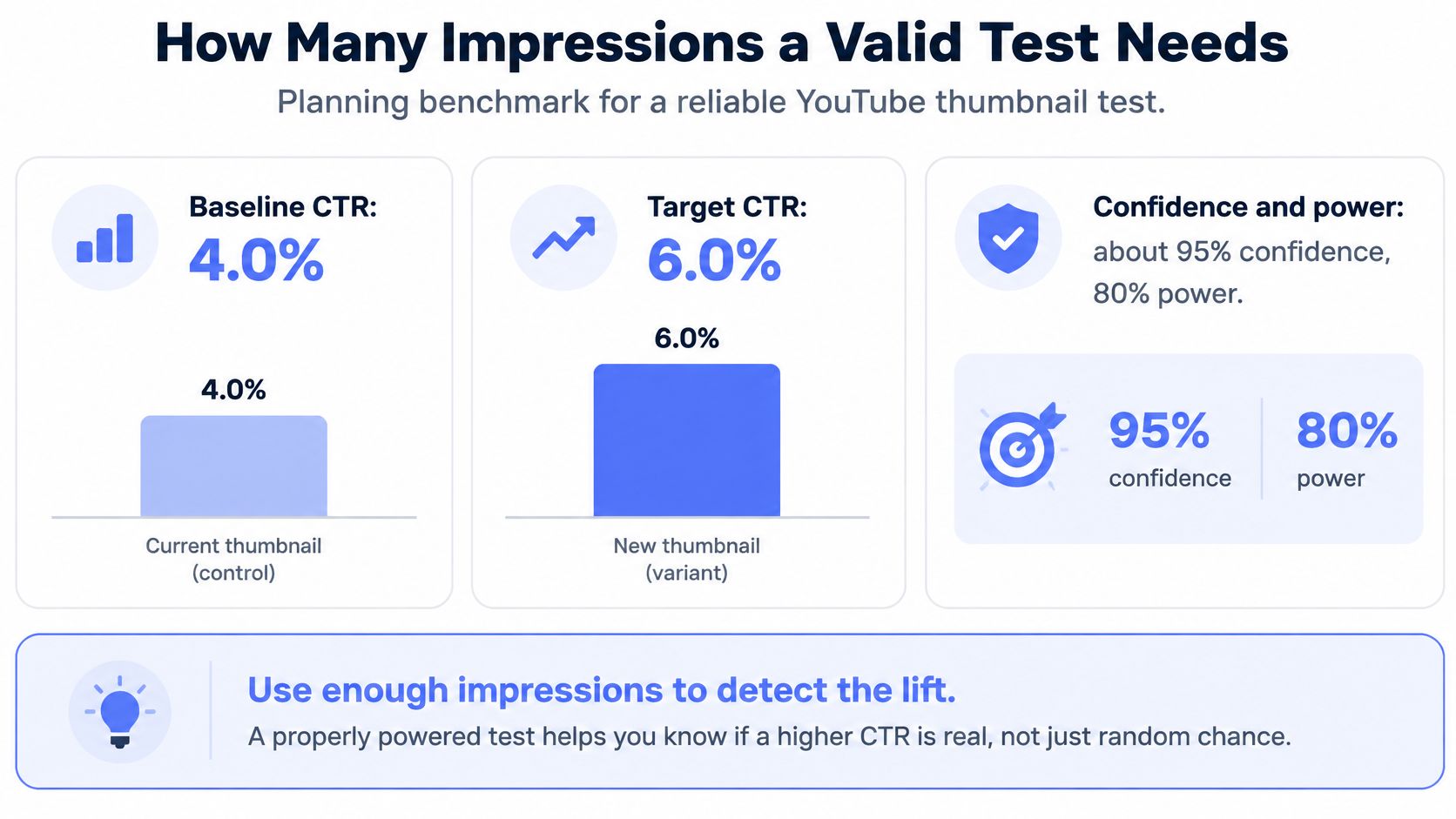
Most brand channels don't have a creative problem when their thumbnail experiments stall; they have a sample-size problem. Apparent lifts look convincing on day two, yet a two-proportion planning benchmark shows how much traffic it really takes to separate signal from luck: starting from a 4.0% baseline CTR, detecting a jump to 6.0% at about 95% confidence and 80% power requires roughly 1,900 impressions per variant (ThumbMagic's YouTube A/B testing guide).
Once you try to measure smaller gains, the math climbs fast. Detecting a 1-point lift from 4.0% to 5.0% requires about 6,700 impressions per variant, and catching a subtle 0.5-point lift to 4.5% takes roughly 25,500 impressions per variant under those same benchmark assumptions.
Baseline to Target CTR | Lift to Detect | Impressions Needed per Variant |
|---|---|---|
4.0% to 6.0% | 2 points | About 1,900 |
4.0% to 5.0% | 1 point | About 6,700 |
4.0% to 4.5% | 0.5 point | About 25,500 |
Running the Two-Week Reality Check for Smaller Brand Channels
Say a B2B software channel publishes an explainer that earns 3,000 impressions a week. Split evenly across two thumbnails, each option gets around 1,500 impressions per week. To detect a 1-point lift reliably, that video would need more than four weeks of traffic, which runs right past YouTube's two-week ceiling.
In that scenario, an inconclusive outcome isn't bad luck. YouTube applies its own statistical significance check before granting a Winner label, so the planning numbers tell you beforehand whether an experiment even has a realistic shot at producing a verdict. Small and mid-sized brand channels get far more mileage out of testing bold creative contrasts, where a 2-point swing is plausible, than chasing microscopic tweaks that demand tens of thousands of views.
Write down two numbers in your test log before you hit start: the minimum impression count per variant and the smallest lift worth changing your creative system over.
Before launching any YouTube thumbnail test, check the target video's recent weekly impressions in Analytics. Pick the smallest lift that would change your design direction, multiply the needed impressions per variant by the number of options you plan to upload, and confirm the video can clear that threshold inside two weeks. If it can't, cut down from three variants to two or pick a higher-traffic catalog video instead.
Designing Variants Worth Testing
A common failure happens before a single viewer ever sees the test. A creative team spends an afternoon shifting an arrow from yellow to orange or enlarging a headline slightly, convinced they've built two distinct concepts. Shrunk to phone width inside a crowded Home feed, both frames blur into the same image.
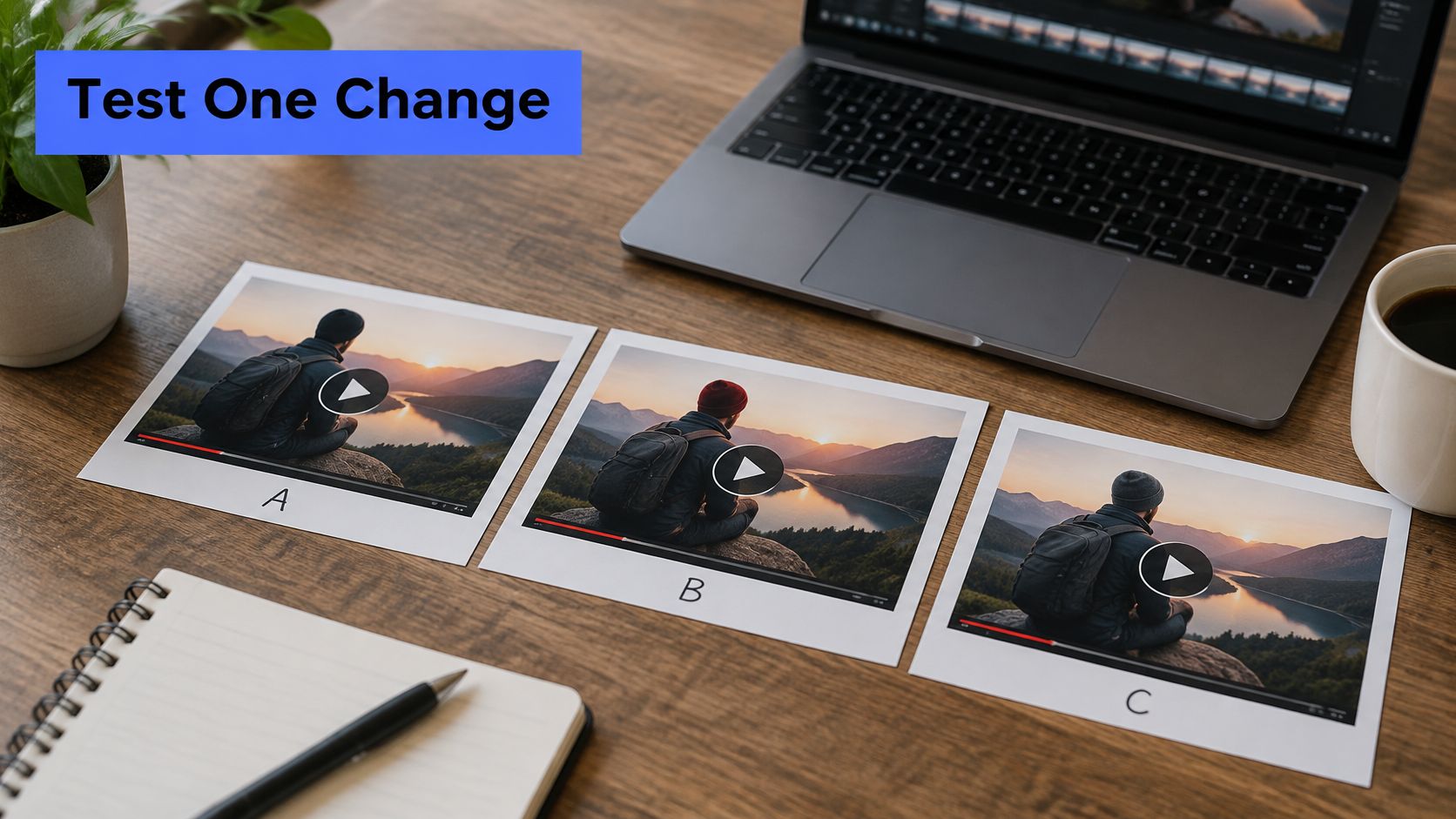
YouTube explicitly cautions that thumbnails that look too similar force experiments to run longer because the system needs far more evidence to tell their performance apart, while reserving a small excluded control group so comparisons among the tested options stay clean (YouTube Help guidance on thumbnail tests). If your channel runs on modest traffic, subtle polish wastes your two-week window.
Compare how distinct visual concepts look side by side before uploading them, as shown below.
Build Every Test Around One Hypothesis and One Visual Variable
Start with a written hypothesis before opening your design file. A strong hypothesis names the visual shift and the expected viewer response, such as predicting that a tight single-product close-up will earn higher qualified watch time than a busy multi-element layout.
Once the hypothesis is set, isolate one major visual variable per experiment while keeping your typography and palette anchored to your video brand guidelines. Useful variables include:
Primary subject: Test a human face showing clear expression against a clean object or interface focal point.
Text density: Compare a zero-text visual frame against a crisp two-to-three-word callout that complements the title without repeating it.
Framing and depth: Pit an ultra-tight crop against a wider contextual shot that establishes setting.
Color contrast: Pair a dark, high-contrast background against a bright, clean backdrop so the silhouette separates cleanly in dark and light mode.
Consider how that works on two different brand channels. A SaaS explainer channel might test a clean dashboard screenshot showing a specific workflow metric against an animated founder portrait signaling a strategic breakdown. A retail brand channel might pit a crisp studio product shot on a white background against a warm lifestyle scene showing the product in daily use. Real estate and hospitality marketers run into the same clarity challenge when choosing hero stills, and cover frame advice for property reels reinforces the same rule: pick one unmistakable focal point that reads instantly on a small screen.
Watch this walkthrough for practical framing examples before sketching your next batch of test concepts.
Protect Your Baseline and Avoid Tangled Changes
Always keep your current best-performing thumbnail in the first slot as your baseline rather than pitting three untested newcomers against each other. If you swap the title, redesign the thumbnail, and trim the video intro at the same time, you won't know which lever moved watch time.
Here's a reliable rule of thumb when you have three slots open: keep your proven baseline in slot one, and send your two challengers in two distinct creative directions. One might simplify the scene down to a single product detail, while the other introduces a human presenter. Even if neither beats the baseline, the spread between them tells you which visual territory deserves your next design sprint.
How to Set Up a Thumbnail Test Step by Step
A clean YouTube thumbnail test takes minutes once the files are ready, yet small setup shortcuts can ruin the readout. Keep the number of moving parts low, then record enough context to judge the result with a clear head. The image may win clicks, but the useful question is whether it attracts viewers who stay, so treat watch-time share as part of the decision from the start.
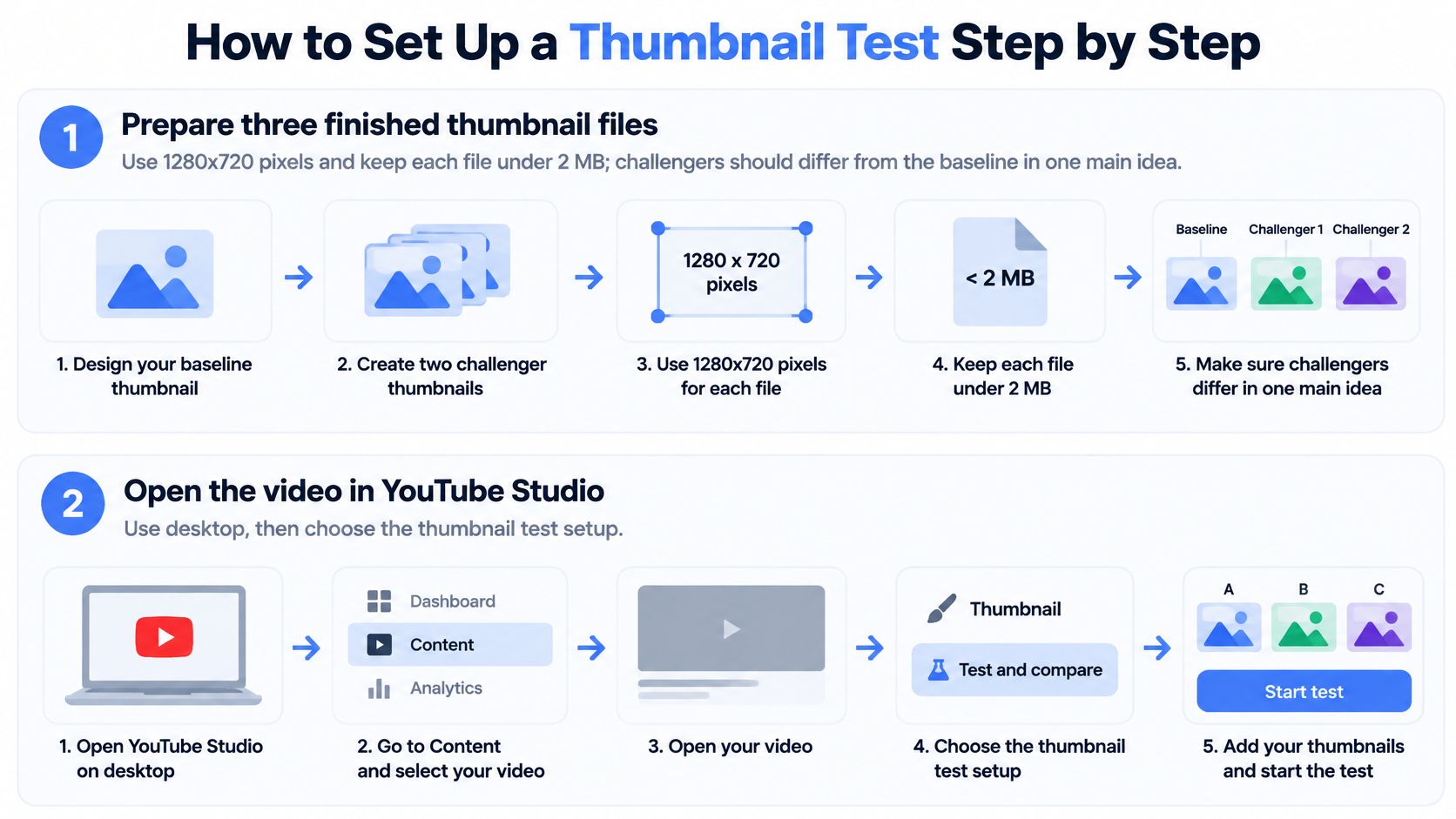
Export up to three finished files at 1280x720 pixels and under 2 MB each. Each challenger should carry one clear visual idea that departs from the current thumbnail. Keep the whole frame readable on a phone, and avoid placing vital details where YouTube overlays the duration stamp. Use the same working file size and crop across the set so the experiment tests creative direction, not inconsistent preparation.
Open the video in YouTube Studio on a desktop browser and launch Test & Compare. You can start during a fresh upload or open an existing video from the Content tab and choose the thumbnail testing option, shown as A/B Testing in updated Studio menus. Desktop access is the practical route here because the mobile Studio app does not give you the same setup control. An established catalog video often has steadier traffic than a brand-new upload, which makes the comparison easier to interpret.
Upload your current thumbnail in the first slot and treat it as the baseline. The baseline gives the test a reference point your channel has already produced results with. Keep that frame in place rather than filling every slot with fresh art, because three untested challengers tell you less about whether any creative improves the video's current performance.
Add one or two challengers while keeping the title, description, and video file untouched. Locking the surrounding elements makes any change in clicks or viewing time easier to trace back to the image. Avoid editing the title or replacing a thumbnail during the run. A mid-test change adds a second variable, and the readout stops being a clean comparison of thumbnails.
Confirm the test start and document launch conditions immediately. Note the start date, the video's primary traffic source, and any paid campaign, newsletter blast, or product announcement active that week. Those notes matter because demand spikes can lift impressions and clicks for reasons unrelated to the image. Without them, a strong result can look like creative proof when it was partly timing.
Set a quick check for day three solely to confirm delivery. Open Analytics, head to the Reach tab, and verify that impressions are accumulating across the variants. Do not judge the winner at this point. The purpose is operational: catch a test that is not collecting impressions and avoid cancelling a run before it has enough exposure.
Export the final numbers the day the test wraps. Record impressions, CTR, average view duration, and watch-time share for every variant before moving to the next video. Keep the numbers with the creative file and the launch notes. Memory is a poor substitute for a record, especially when the team returns months later to decide which ideas deserve another test.
What a Clean Test Log Looks Like
Keep a simple spreadsheet or Notion database with one row per variant rather than one row per video. Each row should capture these fields:
Run dates and status: Start date, end date, and YouTube's official verdict, such as Winner, Performed Same, or Inconclusive.
Creative notes: A short label for the visual variable tested, plus a link to the image file so designers can scan past winners visually.
Performance metrics: Total test impressions, impressions CTR, average view duration, and watch-time share.
Decision record: The metric you used to make the final call and any campaign context active during the run.
A useful log also leaves room for a short interpretation. Write whether the winning frame earned more clicks, held attention better, or did both. A thumbnail that wins CTR but loses watch-time share needs a different follow-up from one that improves both measures.
After five or six logged runs, patterns become easier to spot. Review meetings can move away from personal taste and toward repeated channel behavior: which visual ideas earn the click, which ones keep viewers watching, and which contexts distort the comparison.
Reading Results Beyond Click-Through Rate
Say a consumer tech brand tests two thumbnails on a product comparison video. Variant B uses a dramatic red warning graphic and jumps ahead on click-through rate, while Variant A shows both devices side by side with clean lighting and trails slightly on clicks. Ten days later, YouTube crowns Variant A the Winner. Viewers clicked Variant B out of curiosity, realized the video was a calm technical review rather than a controversy, and left within seconds.
That trap shows why CTR and watch-time share answer two separate questions. CTR measures whether the frame earns the click; watch-time share measures whether the people who clicked stayed to watch.
You also can't judge a thumbnail against a universal "good" click rate pulled from a generic blog post. YouTube reports that impressions click-through rate falls between 2% and 10% for half of all channels and videos, shifting widely by traffic source, audience familiarity, topic, video age, and where the impression appears, while also noting that 90% of its best-performing videos use custom thumbnails (YouTube Help CTR and impressions guide). That custom-thumbnail figure reflects correlation rather than proof that custom art alone drives success, which is why you should always benchmark variants against your own baseline under matching distribution conditions.
Result Pattern | What It Likely Means | What to Do Next |
|---|---|---|
Higher CTR and higher watch-time share | A real packaging win | Roll out the thumbnail and make it the new baseline |
Higher CTR, lower watch-time share | Curiosity clicks that viewers abandon | Do not ship; test a more accurate thumbnail |
Lower CTR, higher watch-time share | Attracts committed viewers | Check the traffic source before deciding |
Similar CTR and watch-time share | No meaningful difference | Keep the baseline and test a bigger contrast |
Early lead before two weeks | Not final | Wait for the platform result or the planned sample |
Segment Checks Before You Generalize a Winner
Before applying a winning visual style across your whole content calendar, dig into YouTube video analytics to see where those impressions landed. A thumbnail that wins heavily on Home and Browse feeds often leans on broad emotional clarity, whereas a frame winning in YouTube Search usually works because it mirrors the viewer's exact query.
Check performance across five practical cuts: traffic source (browse, suggested, search), device type (mobile versus TV or desktop), geography, and returning versus new viewers. A sharp shift in one placement can hide flat performance everywhere else.
Never treat a small raw percentage edge as proof of a breakthrough when sample volume is light; random fluctuation mimics real lift far more often than most teams realize.
If your team wants a clear intuition for why early leads evaporate without statistical confidence, reading a plain-English p-value guide for product designers helps demystify what significance checks are filtering out.
Close every review with one strict grading order: check watch-time share first, then verify that CTR didn't crater sharply. A slight dip in clicks paired with a clear lift in watch-time share often signals better audience qualification, not a broken visual.
Mistakes That Make Thumbnail Results Misleading
Stopping a test the moment one thumbnail pulls ahead is the fastest way to fill your channel with false winners. Early impressions skew heavily toward returning subscribers who already recognize your presenters and style; as YouTube pushes the video out to colder browse and suggested audiences over the next week, rankings frequently flip. Let the platform reach its verdict or wait until your predeclared sample arrives before touching anything.
Several other habits distort results even when a test runs the full window:
Rewarding CTR over retention: Picking the highest click rate while ignoring watch-time share trains your team to produce curiosity bait that alienates viewers and hurts future recommendations; fix it by ranking watch-time share first and inspecting the first-minute retention curve before promoting any high-CTR graphic.
Testing during active promotions or news spikes: Say a travel brand runs a thumbnail experiment right in the middle of a major booking-season sale. Surging purchase intent inflates click rates across the entire channel, tricking the team into crediting the artwork for a seasonal demand wave; log active campaigns at launch and rerun creative tests during steady organic traffic.
Scaling lessons from low-impression niche videos: A narrow support tutorial watched mostly by existing customers behaves nothing like a top-of-funnel brand video competing on Home; segment results by traffic source and viewer type before turning a niche win into a channel-wide template.
Swapping thumbnails manually on a calendar schedule: Rotating images every few days outside Test & Compare mixes different days of the week, shifting audience pools, and changing algorithm distribution; keep comparisons simultaneous inside YouTube's native tool so every option faces identical demand.
Three Checks Before You Trust Any Verdict
Before you lock a learning into your creative playbook, run the finished experiment through a quick three-part audit.
First, verify the audience mix stayed reasonably consistent across the run, without a sudden viral referral or paid push flooding the video halfway through. Second, confirm your promotional status stayed identical from day one to day fourteen so external campaigns didn't skew demand. Third, check that the final impression count cleared your planned threshold rather than settling for a noisy snapshot.
When any of those three breaks, downgrade the finding from a proven rule to an unconfirmed clue and retest it cleanly on a comparable video.
Confirm the Winner Before You Roll It Out
Every completed experiment resolves into one of three clean calls:
Roll out the winner when YouTube assigns a Winner label or your test hits both its predeclared impression sample and target lift.
Keep the baseline when variants land close together or return a Performed Same verdict, saving your team from churning artwork for zero gain.
Build a bolder contrast when the test finishes inconclusive or a higher-CTR challenger fails the watch-time check.
Before making any visual change permanent across a series, run one final verification pass. Confirm that watch-time share rose, verify that CTR didn't collapse unexpectedly, and inspect whether the winning concept holds steady across both search and browse impressions. Once confirmed, apply the winning thumbnail, log the end date, variants, impressions, and decision metric, and carry the core visual lesson directly into your next test, such as pushing an even cleaner contrast along the winning theme alongside broader YouTube channel growth tips.
Connecting Platform Winners to Business Outcomes
YouTube's native tool optimizes for on-platform viewing, yet marketing leaders rarely answer to watch time alone. A disciplined measurement stack separates three distinct layers: attention efficiency (impressions to clicks), content efficiency (clicks to watch time and retention), and business efficiency (qualified site visits, leads, sales, or brand lift), while keeping title and thumbnail variables separate so you know which element drove the shift (YouTube Help overview on title and thumbnail testing).
Clicks and watch time prove viewers cared about the video; they don't automatically prove pipeline or revenue. Pair your test log with UTM-tagged description links, branded search tracking, or conversion reporting so you know whether a higher-watch-time thumbnail attracts qualified buyers. Inside our YouTube Management and audience growth engagements, we tie custom thumbnails directly into cohesive channel branding, optimized video layouts, video SEO and metadata setup, channel health audits, short-form clips, and ongoing performance analysis so packaging tests feed measurable channel growth rather than sitting in isolation.
Pick one high-impression long-form video from your catalog this week, upload your current thumbnail as the baseline alongside two distinct challengers, and put the two-week review date on your calendar right now.

If your team wants structured creative testing without pulling internal designers off core campaigns, our YouTube-certified strategists and producers handle custom thumbnails, metadata setup, channel health audits, and ongoing audience growth analysis end to end. Explore how we build repeatable channel systems that turn impressions into qualified demand at Busylike.
