
Video Translation Explained: Subtitles, Dubbing and QA

Your English product demo is live, and the analytics show Spanish and German viewers arriving. Say it's a 90-second SaaS walkthrough: the interface looks clear, but the explanation, feature labels and closing offer are still in English. You need to decide what to translate, how much to automate and who can approve the result before it reaches prospective customers.
Table of Contents
What Video Translation Covers and Why It Matters Now - Think beyond language access
Subtitles Versus Dubbing for Brand Videos - Choose by viewing situation
How a Video Translation Workflow Runs Step by Step - Build from an approved source - Produce and validate the deliverables
What AI and Human Review Really Cost in Time - Budget for the work that remains
Why Machine Translation Fails on Brand Content - Fluent wording can hide the wrong message - Assign the right treatment to each element
Quality Checks for Branded Video Localization - Run the QA pass in order
Pick Your First Video to Localize - Rank the candidates before commissioning - Make the production reusable
What Video Translation Covers and Why It Matters Now
Video translation converts a video's spoken words and on-screen text into another language. The deliverables might include subtitles, dubbed audio, translated captions, re-set graphics, and translated titles and descriptions. For that SaaS demo, translating the narration but leaving an important feature label untouched would leave the job unfinished.
Localization goes further. It adapts references, units, currency and visuals for the intended market. A translated demo can explain the same interface in German; a localized demo might also show the relevant billing currency and replace an example that wouldn't make sense to German buyers.
The audience signals behind these decisions deserve a closer look.
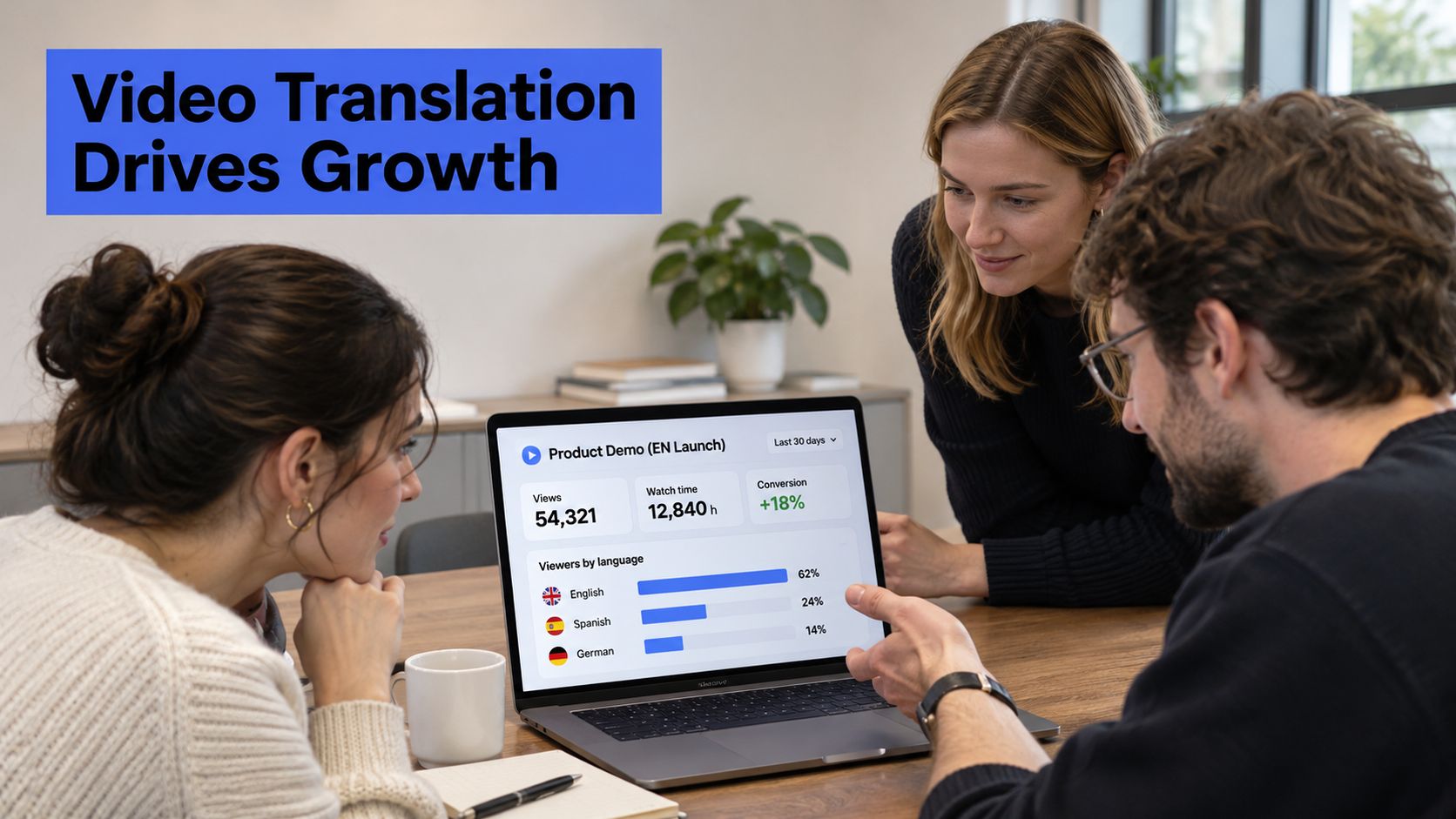
Think beyond language access
According to Mark Studios' video localization statistics, YouTube reported that creators using multi-language audio received more than 25% of watch time from viewers watching in a different language from the original in July 2025, up from more than 15% during its January 2023 early test. Those figures describe adopters, not every channel. They show why translated audio matters to audience composition, not just whether existing viewers can understand a video.
Treat the opportunity as a distribution decision. Your global content marketing strategy should connect language choices to actual markets, relevant offers and channels your team can maintain. Don't commission a language version if its landing page and next step still leave the viewer stranded.
Production planning matters, too. If you're creating new source assets, LunaBloom AI's text-to-video marketing tips offer useful context for thinking through generated video before you create versions for different audiences.
Before commissioning work, answer:
Which languages? Prioritize audiences with a clear commercial reason to engage.
Which channels? Identify where viewers will encounter each version.
Which assets? Name the master videos, cutdowns, graphics and metadata that need translation.
Subtitles Versus Dubbing for Brand Videos
Subtitles win on speed, cost and breadth of markets. Dubbing wins when voice and tone carry the message. Neither format is more professional by default. The right choice follows how people will watch and what each format puts at risk when it goes wrong.
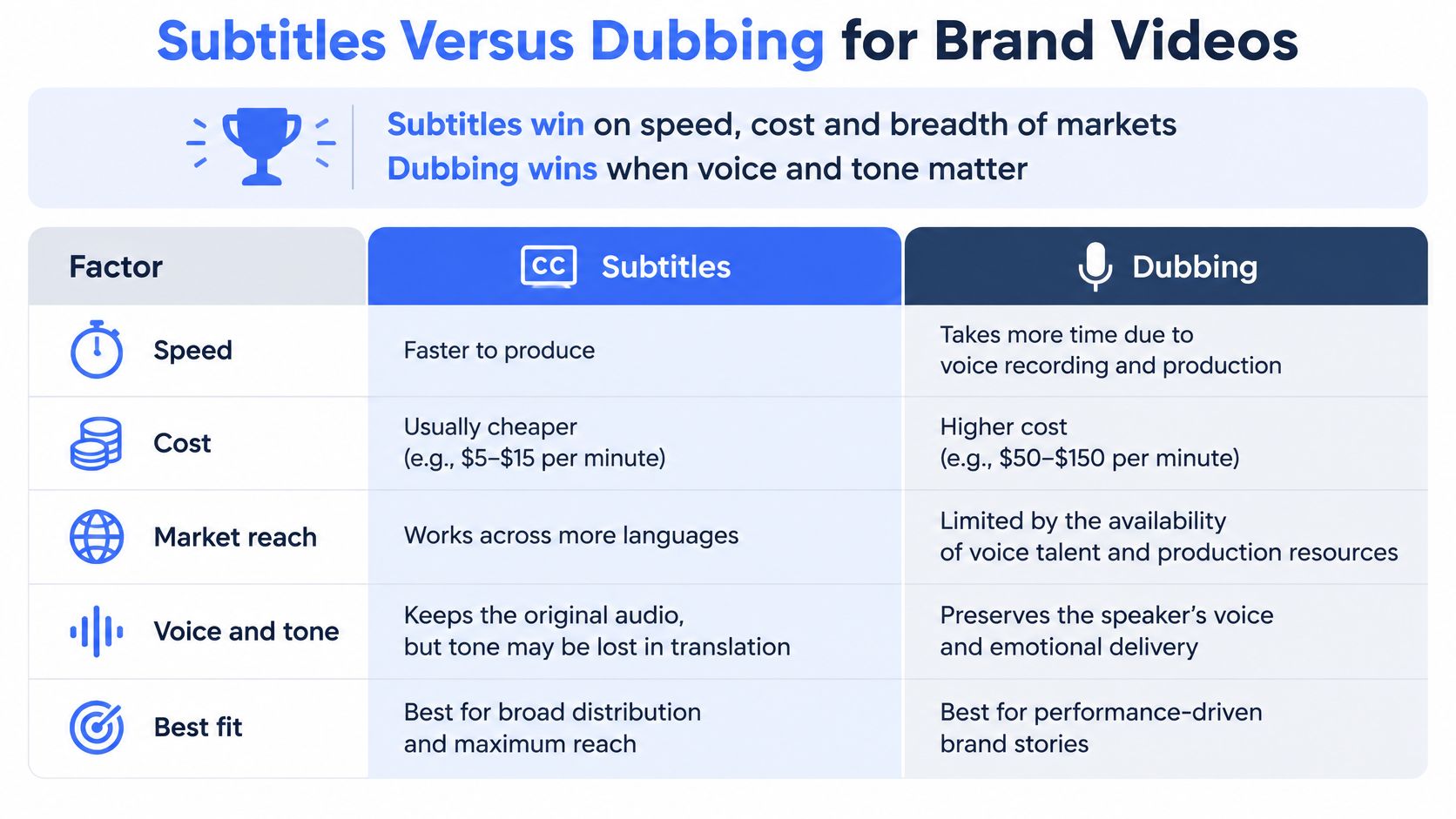
Subtitles and dubbing compared on the criteria that decide the format
Factor | Subtitles | Dubbing |
|---|---|---|
Keeps the original speaker's voice | Yes | No, voice is replaced |
Works with sound off or muted autoplay | Yes | No, needs audio |
Lip-sync and timing demand | Cue timing only | Must match pacing and mouth movement |
Typical cost driver | Translation, timing and cue review | Voice performance, recording and synchronization |
Where it fails fastest | Cues too fast to read, on-screen text left untranslated | Flat delivery, visible lip drift |
Best fit | Explainers, social feeds, accessibility, fast market tests | Brand films, ads needing a native feel, hands-free viewing |
For an off-camera narrator, mouth matching is unnecessary, but spoken pacing still is. For an on-camera interview, the replacement performance must fit the visible delivery. A read that runs long forces the editor to compress pauses, and rushed audio reads as detached from the person on screen.
Subtitling tends to account for the larger share in market estimates of video translation services, ahead of dubbing. That describes demand across the market, not what your project should cost. Format follows the viewing situation.
Choose by viewing situation
An explainer or B2B demo watched with sound on can often ship with subtitles. Viewers keep the original presenter's delivery while reading the translated explanation. The catch is attention: reading and watching compete for the same eyes. If the video asks viewers to follow a cursor through an interface while reading, subtitles can overload them, and a voice track would free their gaze for the screen.
A founder film or testimonial can justify dubbing when emotional delivery carries the credibility. The aim is to recreate the speaker's intent through a convincing target-language performance. A flat or miscast read does the opposite, because viewers sense the gap between the face and the voice, and a video built to create trust starts to feel staged. Plan voice-overs for videos around casting, pronunciation and performance direction rather than a translated word count.
Paid social with muted autoplay needs subtitles first. A hero film might earn a dubbed version while secondary edits stay subtitled. Zemith's guide to manual and AI caption workflows walks through the different ways subtitle files get produced, which affects both turnaround time and how much review each method demands.
Watch the spoken delivery alongside the visuals when judging whether replacement audio will help.
Format test: Is the voice part of the message, or does it mainly deliver information?
For a library rollout, subtitle first. Add dubbing selectively where the spoken performance earns the extra production effort instead of assigning the same treatment to every asset.
How a Video Translation Workflow Runs Step by Step
A translated line can be grammatically perfect and still damage the brand. It can appear a beat too late, split a product name across two subtitle lines, or vanish before a viewer finishes reading. Translation, timing, segmentation and readability depend on each other, and the TACL paper on direct speech translation for automatic subtitling treats these as connected production constraints rather than text translation alone.
Think of the workflow less like converting words and more like quality control on a production line. Each stage hands risk to the next one, so a weak glossary upstream becomes an inconsistent product name downstream. The production flow should keep those checks connected.
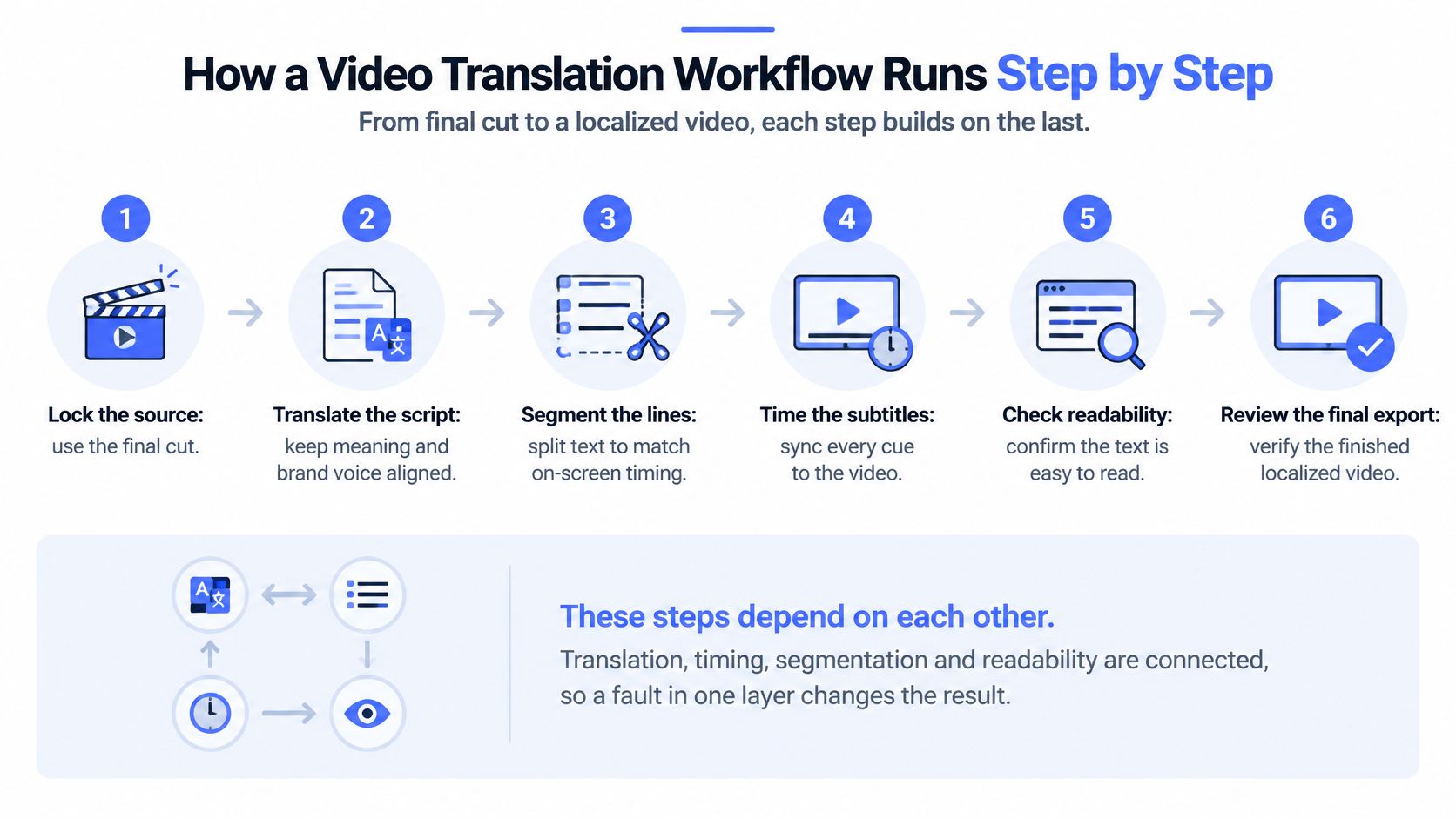
Build from an approved source
Lock the source. Use the final cut or approved script, then verify the transcript and speaker labels against the actual recording. An outdated transcript can carry a deleted claim into every language, and once that claim ships it becomes a compliance problem rather than a typo.
Build the glossary. Record product names, approved claims, legal lines, brand terms and words that must stay untranslated. Without this reference, the same feature can acquire different names across the demo and its cutdowns, which reads to a distributor or customer like two different products.
Translate with context. Give the translator or AI system the video, intended audience and glossary, then have a translator check the first pass. A line referring to an on-screen button can sound reasonable while naming the wrong control.
Time and segment. Split the translation into readable units and set each cue's in and out points. Don't preserve source-language line breaks when they separate a target-language phrase unnaturally.
Produce and validate the deliverables
Create the output. Generate or record the dubbed voice, or build the subtitle cue files. Listen for mispronounced names and check that subtitle exports haven't lost punctuation or characters.
Assign a human post-editor. Review terminology, omissions, unnatural phrasing, brand voice and synchronization. A grammar-only pass can miss a fluent sentence that reverses the intended meaning, and that reversal is exactly the kind of error a machine scores as correct.
Render in context. Play the localized version in the player on the target channel. An otherwise clean file can fail when player controls or platform overlays cover essential text.
Deliver separate language tracks. Keep localized text tracks beside the master video where the platform supports them, so viewers can select a language without re-encoding the underlying video. Confirm the required packaging for YouTube, CTV and owned players before final export, since each destination handles track delivery differently.
Treat on-screen text as its own translation layer. Inventory every burned-in title, lower-third and chart, apply the glossary, and re-set the text in the source graphics. Pasting translated text over the original can conceal layout problems rather than resolve them, and longer target-language strings are the usual culprit when a lower-third overflows its safe area.
After approval, coordinate release dates and language metadata. Social Media Scheduler's YouTube video scheduling tool can support publishing coordination, but scheduling belongs after final language approval, not before it.
What AI and Human Review Really Cost in Time
The manual baseline in a 2025 multimedia-localization study was 22 working hours per language for subtitles and 27 for voice-over; its AI-assisted cascade used 10 and 13.5 hours, with reported cost reductions of 41% and 73%, while its integrated workflow used 7 hours for each, with reported savings of 71% and 86% respectively. These are study workflow measurements, not vendor quotes or a promise about your next video.
Hours per language by workflow and format
Workflow | Subtitles (hours per language) | Voice-over (hours per language) | Reported saving |
|---|---|---|---|
Manual | 22 | 27 | Baseline |
AI-assisted cascade | 10 | 13.5 | Subtitles 41%, voice-over 73% |
Integrated workflow | 7 | 7 | Subtitles 71%, voice-over 86% |
The reported saving column refers to cost reductions, not percentages calculated directly from the working-hour columns. Don't treat elapsed production time, human labor and cost as interchangeable measures.
A cascade passes work through separate stages, such as transcription, translation and voice generation. An integrated workflow connects those stages more closely. The operational question is how much manual transfer, correction and rework remains between them.
Budget for the work that remains
In a separate AMTA workflow study, an 11-minute video required 19 hours of human subtitling labor per language traditionally and 8 hours with AI assistance, a reduction of more than 50%; the study also reported human-labor reductions above that level for voice-over. That's evidence for reducing labor through assistance, not eliminating language specialists.
The remaining work includes correcting recognition errors, checking meaning, editing awkward phrasing, resolving terminology and approving the finished output. Source quality changes this burden: overlapping speakers, unexplained acronyms and a constantly changing edit create more decisions than a clean narration.
Automation should remove repetitive handling, not the approval responsibility.
Build the budget around separate work packages:
Automated processing. Transcription, draft translation, initial timing and generated audio.
Human review. Language editing, pronunciation correction, cultural judgment and synchronization.
Final approval. Brand, subject-matter and finished-render sign-off.
Ask for processing, review and final approval to be priced separately. Also specify what happens when the source changes after translation begins, because revising the narration may require changes to timing, subtitles, graphics and audio together. Don't cut the review allowance just to make the budget resemble a study's savings.
Why Machine Translation Fails on Brand Content
A translation can be fluent and still create an expensive mistake. Say a product claim describes software as helping users identify potential issues, but the translated narration promises that it prevents those issues. The sentence sounds polished, yet the marketing team has published a stronger claim than the approved source.
A regulatory qualification can fail in the opposite direction. If a translation softens an exclusion or drops a condition, viewers may misunderstand who can use the product or what the offer includes. Word accuracy isn't enough when the relationship between words defines the claim.
Fluent wording can hide the wrong message
Humor and idioms introduce different problems. A joke built around a familiar local reference may become meaningless elsewhere, while an idiom translated word for word can suggest something unintended. A healthcare explanation or financial product video needs even closer attention because a casual substitute can change a precise distinction.
A 2025 survey published in the Research Journal in Advanced Humanities, involving 4,500 participants, found that more than 70% noticed linguistic errors, 66.5% noticed missed cultural references, and 73% preferred human-translated subtitles, with lower trust in automated subtitles for educational and formal content. Those findings make credibility a practical production concern, not merely a stylistic preference.
A viewer doesn't need to identify the translation error precisely to lose confidence in the explanation.
Machine output can be enough for a low-stakes internal preview or a disposable clip without substantive claims, provided someone checks for obvious errors. It's a weaker release standard for explainers, B2B demos, healthcare, finance and brand films, where viewers are evaluating competence as well as content.
Assign the right treatment to each element
Don't label an entire project AI or human and stop there. Divide the work by the consequences of getting it wrong:
AI translates the repeatable material. Draft straightforward narration and recurring descriptions using approved terminology.
Humans review consequential meaning. Have language specialists check the translation and subject-matter owners approve claims, qualifications and technical explanations.
Creative specialists rewrite or re-record persuasion. Adapt taglines, humor and emotionally important lines when literal translation won't produce the intended response.
For example, a product demonstration might use an AI first pass for procedural narration, specialist review for security claims and a newly recorded closing line. That's a more useful decision than choosing one technology for the whole film.
Set approval authority before production starts. A native-speaking colleague can flag awkward phrasing, but shouldn't automatically become responsible for approving regulated language outside their expertise.
Quality Checks for Branded Video Localization
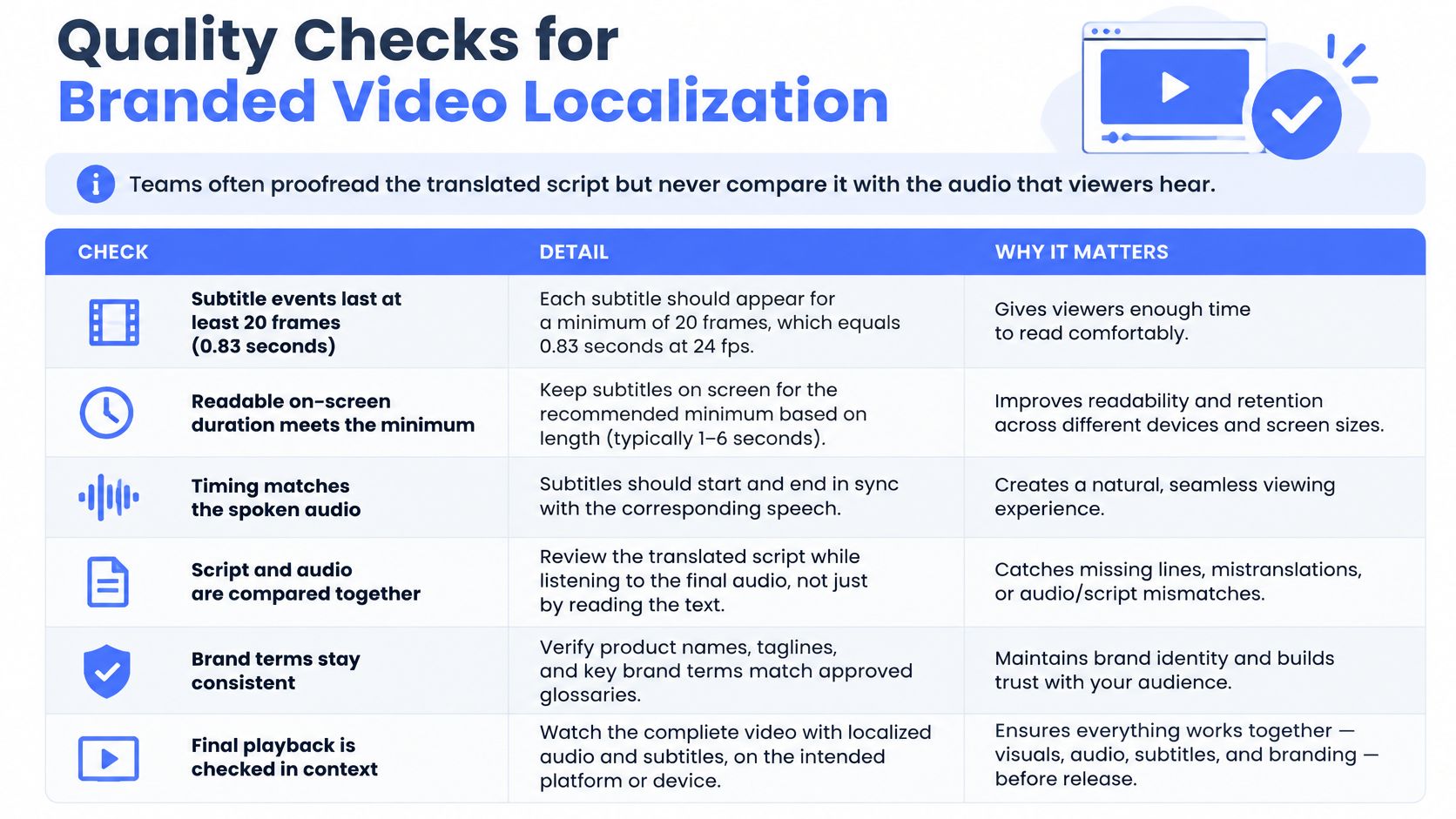
Teams often proofread the translated script without comparing it with the audio viewers will hear. That misses omissions, incorrect speaker assignments and subtitles that no longer match a revised recording. Review the text, sound and picture together.
Netflix's general timed-text requirements set subtitle duration at a minimum of 20 frames at 24 frames per second, approximately 0.83 seconds, and a maximum of 7 seconds, with centered top or bottom placement adjusted around on-screen text. Its English timed-text guidance permits up to 20 characters per second for adult programs and 17 for children's programs, while prioritizing language and timing alignment with original or dubbed audio for marketing assets.
Subtitle and localization QA thresholds
Check | Reference threshold | What to verify |
|---|---|---|
Subtitle duration | 20 frames at 24 fps, approximately 0.83 seconds, to 7 seconds | Reject cues outside the range and merge short ones |
Reading speed | Up to 20 characters per second for adult English, 17 for children's | Document exceptions; don't sacrifice audio alignment mechanically |
Placement | Centered, top or bottom, moved off on-screen text | Check against logos and lower-thirds in the render |
Audio alignment | Matches dubbed or original speech in timing | Compare each cue with the track, not the script alone |
Terminology | Glossary terms and product names used identically | Search every cut for drift between versions |
Meaning and cultural fit | Claims, idioms and regulatory lines keep source sense | Native reviewer signs off each target market |
These are reference specifications, not universal limits for every language and platform. Establish the destination's requirements before applying automated checks.
Run the QA pass in order
Verify transcript completeness. Compare it with the final audio, including closing lines and qualifications.
Check names and terminology. Confirm speaker identification, product spelling and approved feature names.
Match subtitles to speech. Use the dubbed track for captions accompanying that dub, rather than assuming the source translation still matches.
Assess reading speed. Simplify phrasing without removing substantive meaning.
Inspect shot changes. Check whether a cue carries confusingly across a change in speaker or scene.
Find visual collisions. Review logos, lower-thirds, charts and player overlays.
Approve meaning and cultural fit. Escalate altered claims and unsuccessful idioms.
Play the finished platform version. Confirm track selection and actual playback, not just the export file.
For example, a hypothetical half-second cue fails the reference minimum. Merge it with a neighboring line when the speech and sentence structure allow, rather than stretching it into unrelated dialogue.
Use the visual pass to catch problems a text editor can't show.
Keep typography, placement and terminology decisions in your video brand guidelines, alongside a record of who approved exceptions. For marketing assets, don't force a reading-speed target when doing so breaks audio alignment. Document the trade-off and obtain approval.
After launch, compare watch time and drop-off by language against the source version. Investigate where viewers leave, while accounting for differences in audience and placement before blaming the translation.
Pick Your First Video to Localize
Start with a video that has a clear audience opportunity and a manageable approval path. The biggest campaign isn't necessarily the best pilot. A stable product explanation can teach your team more than a launch film whose script is still changing.
Rank the candidates before commissioning
Give each candidate a simple low, medium or high assessment across these criteria:
Other-language audience share. Is there existing interest from viewers your current version doesn't serve well?
Cost of a wrong claim. Would an error cause mild confusion, a lost sale or a serious compliance concern?
Channel fit. Can you deliver and maintain the required language tracks, graphics and destination pages?
Choose one master video and two languages as a practical starting scope. Set the glossary before translation begins, name the final approvers and decide which source changes would require another review. A bounded project gives the team a useful production test without spreading approval work across the whole library.
Apply the format decision to individual deliverables. An information-led product walkthrough may only need subtitles; a persuasive hero cut may justify voice-over. Keep those choices tied to viewing conditions and the role of spoken delivery, not a blanket preference for either format.
Make the production reusable
A team planning a travel or product film can prepare clean graphics, separate narration and modular edits so the same production supports regional versions. Keep source files editable and record which master each localized cut came from. That makes future corrections less likely to leave an outdated claim in a secondary asset.
At Busylike, we offer video localization, subtitling, voiceover and localized cutdowns, so one travel production can serve audiences across regions and platforms. Our AI-assisted process uses generative video, AI voiceover and automated versioning to speed up edits and create more ad variations, with human creative direction keeping content on brand and accurate.
Before commissioning the pilot, settle three questions: Which video will you localize? Which two languages will you start with? Who approves the glossary and final render? Put those answers beside the master file so everyone starts with the same scope.
Busylike offers video localization, subtitling, voiceover and localized cutdowns to help brands adapt a production for different audiences and channels. Visit Busylike to discuss a first project with your chosen master video, target languages and approval requirements.
